
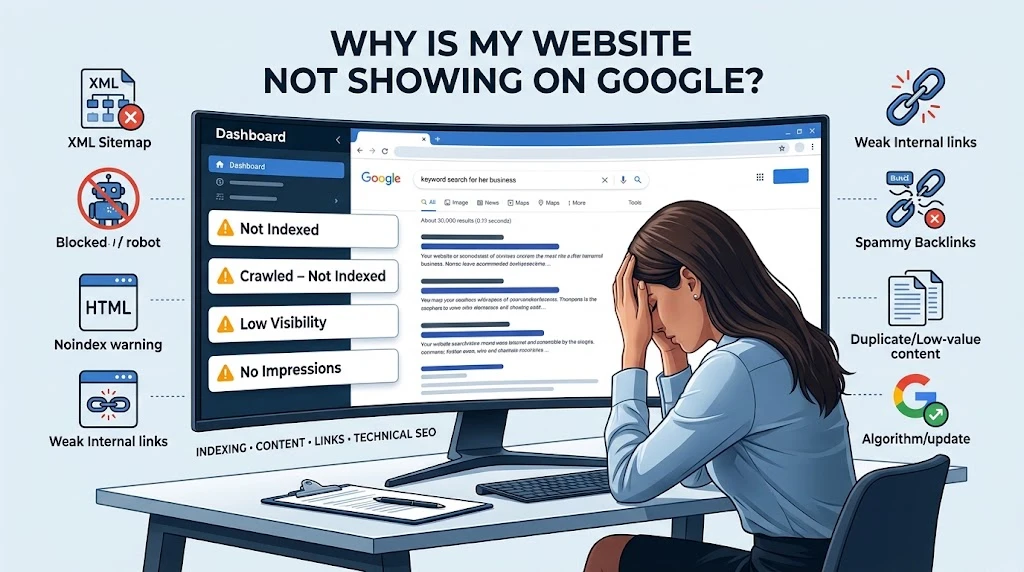
If your website is not showing up on Google, the first thing to work out is whether the site isn’t indexed at all, or whether it’s indexed but simply not ranking. These are two different problems with two different fixes, and mixing them up wastes time.
Run a quick site:yourdomain.com search in Google. If nothing appears, your pages likely aren’t indexed. If pages do appear but not for the terms you want, indexing isn’t the issue, ranking is. Google Search Console’s URL Inspection tool will confirm which situation you’re in within seconds.
This guide walks through both cases: why Google might not be showing your website at all, and why an indexed page still isn’t ranking.
13 Common Reasons at a Glance
| # | Reason | Fix Area |
|---|---|---|
| 1 | Google can’t crawl the site | Robots.txt, noindex, server errors |
| 2 | Sitemap isn’t helping discovery | Sitemap errors, non-indexable URLs |
| 3 | Content adds no real value | Depth, originality, examples |
| 4 | Lost visibility after an algorithm update | Content quality vs competitors |
| 5 | Spammy or weak backlink profile | Link relevance, toxic patterns |
| 6 | Weak internal linking | Orphan pages, link distribution |
| 7 | Google picked a different URL | Canonical tags, duplicates |
| 8 | Too many similar, low-value pages | Content consolidation |
| 9 | Doesn’t match search intent | Content format vs query type |
| 10 | Weak internal SEO signals | Titles, headings, URLs |
| 11 | Site is new and unproven | Time, consistency, trust signals |
| 12 | Technical or security problem | Mobile, HTTPS, malware, manual actions |
| 13 | Indexed but not competitive | Content depth vs top-ranking pages |
First, Find Out Why Google Isn’t Showing Your Website
Is Your Website Actually Not Indexed?
Type site:yourdomain.com into Google. If your homepage or key pages don’t show up, they’re not in Google’s index yet. Cross-check this in Google Search Console under Pages, it lists exactly which URLs are indexed and which aren’t, along with the reason.
Is Your Website Indexed but Ranking Too Low?
An indexed page and a ranking page are not the same thing. A page can sit in Google’s index without ever appearing on page one for your target keywords. In Search Console’s Performance report, check impressions and clicks, impressions with almost no clicks usually means you’re ranking somewhere far down the results, not that you’re invisible.
What Does “Crawled – Currently Not Indexed” Mean?
Google visited the page but chose not to add it to the index. This is usually a content-value decision, not a technical block, Google decided the page didn’t add enough beyond what’s already ranking.
What Does “Discovered – Currently Not Indexed” Mean?
Google knows the URL exists (often from your sitemap or a link) but hasn’t crawled it yet. This often happens when a site has too many low-value pages competing for a limited crawl budget.
1. Google Can’t Crawl Your Website Properly
If Googlebot can’t reach your pages, they can’t be indexed, let alone ranked, this is one of the most common technical reasons a website is not showing up on Google, so start here before anything else.
- Robots.txt blocking Googlebot — check
yourdomain.com/robots.txtfor aDisallowrule that’s blocking important folders. - A noindex tag on the page — even one page with
noindexin its meta tag or header will keep it out of Google entirely. - 403, 404, or 5xx server errors — Search Console’s Pages report will flag these directly.
- Slow or frequently unavailable servers — repeated timeouts during a crawl attempt can cause Google to back off.
- Security plugins, firewalls, or a CDN blocking Googlebot — some firewall rules mistake Googlebot’s crawl pattern for a bot attack and block its IP ranges.
A full technical pass, including these exact checks, is covered in this step-by-step website audit.
2. Your Sitemap Isn’t Helping Google Discover Your Pages
A sitemap is meant to help Google find your pages faster but a broken one can do the opposite.
- Missing XML sitemap — without one, Google relies purely on links to discover new pages, which is slower.
- Sitemap errors in Search Console — check the Sitemaps report for parsing or fetch errors.
- Non-indexable URLs listed in the sitemap — pages marked noindex shouldn’t be in there at all.
- Redirects, 404s, or duplicate URLs inside the sitemap — these send mixed signals about which version of a page is the real one.
Submitting a sitemap does not guarantee indexing. It only tells Google a page exists, Google still decides independently whether that page is worth indexing based on its quality and uniqueness.
3. Google Doesn’t See Enough Value in Your Content
This is usually the biggest reason a website not showing up on Google stays that way, even after every technical box is ticked.
- Technically correct but adds nothing new — the page is accurate but says nothing the top-ranking pages haven’t already said.
- Repeating what every competitor already says — if ten other pages cover the same points in the same order, Google has no reason to add an eleventh.
- Reads like an AI rewrite of existing search results — content that summarises what’s already ranking, without new detail, tends to sit un-indexed.
- Talks about a topic without real examples — general statements without specifics rarely satisfy the searcher’s actual question.
- Mentions a problem but not the tools or methods to fix it — this is where generic advice falls short.
For example, “use tools for MSP SEO” tells a reader nothing useful. A stronger version names the actual process: check Google Search Console for non-indexed location and service pages, review the Google Business Profile for local visibility gaps, run Screaming Frog for crawl issues, and use Ahrefs or Semrush to see which pages competitors already rank with. That level of detail is what separates a page Google indexes from one it skips.
This is covered in more depth in this guide on ranking an MSP website on Google, and in how SEO content actually converts service clients rather than just filling a page.
- No first-hand experience or original observations, content built only from research, with no direct testing or real screenshots, tends to blend in with everything else already ranking.
4. Your Website Lost Visibility After a Google Algorithm Update
A drop after an update doesn’t automatically mean a penalty. Updates usually re-evaluate content quality across the board, and pages that were only “good enough” can lose ground to pages that are genuinely more useful.
- The update can expose existing weak content rather than create a new problem.
- Competitors may have simply become more useful, not because your page got worse.
- The problem isn’t always the update itself — check whether your content, backlinks, or technical setup changed around the same time.
- Compare your page before and after the drop using Search Console’s date-range comparison in the Performance report.
- Check what changed in the search results for your target keyword new competitors, featured snippets, or a shift in search intent can all explain a drop.
If a ranking drop looks tied to a broader content quality shift, this breakdown of recovering ranking drops with semantic SEO is worth reading before making any changes.
5. Your Website Has a Spammy or Weak Backlink Profile
Backlinks still matter, but the wrong kind can hold a site back rather than help it.
- Spammy backlinks can hurt more than help, particularly if they come from link farms or irrelevant, low-quality sites.
- Thousands of cheap links don’t equal authority — Google weighs relevance and trust far more than raw volume.
- Check whether your backlinks are actually relevant to your industry and topic.
- Watch for toxic patterns: sudden spikes in new links, exact-match anchor text repeated across many domains, sitewide footer links, or links from unrelated foreign-language sites.
- Only worry about bad backlinks when they form a clear pattern one or two odd links rarely cause harm on their own.
Instead of buying more links, focus on earning ones that are actually relevant. These backlink building techniques and this guide to building backlinks without guest-post spam both focus on quality over quantity. It’s also worth knowing that Domain Authority and Page Authority aren’t actual Google ranking factors they’re third-party metrics, not something Google itself uses.
6. Your Internal Linking Is Making Important Pages Hard to Find
- Orphan pages (pages with no internal links pointing to them) can be genuinely difficult for Google to discover.
- Important pages with too few internal links send a weak signal about how much they matter on your site.
- Internal links that don’t reflect your site’s topic structure dilute relevance instead of reinforcing it.
- Random internal linking doesn’t build topical authority links should connect genuinely related pages, not just any page to any other page.
To find pages that need more internal links, check Search Console’s Links report for pages with very few internal links pointing in, and prioritise fixing those first.
7. Google Is Choosing a Different URL Than You Expect
- Canonical tag pointing elsewhere — check the page’s canonical tag; if it points to a different URL, Google will index that one instead.
- Duplicate pages competing with each other — near-identical pages split ranking signals instead of combining them.
- Google picked its own canonical, overriding what you set, when it judges another URL to be more representative.
- HTTP vs HTTPS, www vs non-www — inconsistent versions of your site confuse which one Google should treat as primary.
- Redirects sending Google somewhere else than the page you intended to rank.
8. Your Website Has Too Many Similar or Low-Value Pages
- Programmatic pages with little unique information — pages generated from templates with barely any real difference between them.
- Location pages that only swap the city name — without genuinely local content, these read as duplicates to Google.
- Multiple articles targeting the same search intent — these compete against each other rather than one clear page winning.
- Thin category, tag, or archive pages with little actual content.
More pages doesn’t automatically mean better SEO. A hundred weak, near-duplicate pages can hurt a site more than twenty genuinely useful ones, because they spread Google’s crawl attention thin and dilute overall site quality signals.
9. Your Page Doesn’t Match What Searchers Actually Want
- Answering the wrong search intent — a well-written page can still fail if it doesn’t match what the searcher is actually looking for.
- Informational, commercial, and transactional intent are different — a guide won’t rank for a query that wants a product page, and vice versa.
- A good page can still be the wrong page for that particular query.
- Analyse what’s already ranking for your target keyword before assuming your content is the right format.
Getting the keyword and intent right from the start avoids this problem later. This approach to MSP SEO keyword research covers how to match content to actual search intent rather than guessing.
10. Your Website Has Weak Internal SEO Signals
- Poor or duplicate title tags across multiple pages confuse which page should rank for what.
- Weak H1 and heading structure makes it harder for Google to understand what the page is actually about.
- Target keywords not used naturally in the content, headings, or page copy.
- URLs that don’t describe the page clearly.
- Important pages not linked from navigation, making them harder to find.
- Images, JavaScript, or content not rendering properly, so Google sees an incomplete version of the page.
A closer look at these smaller technical details often uncovers hidden ranking errors on service websites that aren’t obvious at first glance.
11. Your Website Is New and Hasn’t Built Enough Trust Yet
New sites need time to be crawled, evaluated, and trusted this isn’t a technical fault, just a normal part of how Google works.
- Publishing 50 articles in a short window doesn’t automatically build authority; quality and consistency matter more than volume.
- Internal links, genuinely useful content, brand mentions, and backlinks all work together to build trust over time none of them alone does the job.
If your site is new, this guide on ranking a new website on Google lays out a realistic timeline and the right order to tackle things in.
12. Your Website Has a Technical or Security Problem
- Mobile rendering problems — Google primarily uses the mobile version of your site for indexing.
- JavaScript rendering issues — if content only loads via JavaScript and doesn’t render properly, Google may not see it.
- HTTPS and certificate problems — an invalid certificate can block both users and crawlers.
- Hacked or compromised pages, sometimes injecting spam content invisible to normal visitors.
- Malware or security warnings attached to the site in Search Console.
- Manual actions — check the Manual Actions report in Search Console; this shows if Google has directly penalised specific pages or the whole site.
These and other common oversights are covered in this list of technical SEO mistakes worth checking early.
13. Your Website May Be Indexed but Not Competitive Enough to Rank
Indexing and ranking are not the same thing. Google can index a page perfectly well and still choose not to show it in the top results, simply because stronger, more complete pages already exist for that query.
- A high search volume for a keyword doesn’t mean your specific page has real ranking potential against the current competition.
- To find the actual weakness, compare your page section by section against what’s currently ranking on page one depth, structure, freshness, and specificity are the usual gaps
If a page still isn’t ranking despite being indexed, this breakdown of why a service business isn’t ranking walks through how to isolate the real cause with an audit.
How to Diagnose Why Your Website Is Not Showing Up on Google
If your website is not showing up on Google, work through these steps in order rather than jumping straight to a fix:
- Search
site:yourdomain.comto see what’s currently indexed. - Inspect the URL in Google Search Console to see its exact indexing status.
- Check the page indexing report for patterns across the whole site, not just one page.
- Check robots.txt and noindex tags for accidental blocks.
- Check the sitemap for errors or non-indexable URLs.
- Check the canonical tag to confirm Google isn’t indexing a different version.
- Check internal links pointing to the page.
- Audit content quality against what’s currently ranking.
- Analyse backlinks for relevance and toxic patterns.
- Compare the page against current search results for the target keyword.
Running through this checklist manually takes time; a free SEO audit can flag most of these issues in one pass, and the right combination of SEO tools makes ongoing monitoring far easier.
Why Simply Rewriting Your Article May Not Fix the Problem
Rewriting isn’t the same as adding value. Changing the wording of an existing article, without adding anything new, still leaves Google with a page that offers nothing beyond what’s already ranking.
What actually helps instead:
- Original examples and real screenshots
- Actual tools, named specifically, not just “use SEO tools”
- Real data or test results
- First-hand observations from your own experience
- Specific, step-by-step troubleshooting instructions
- Direct comparisons
- Templates or checklists readers can actually use
- Real scenarios, not hypothetical ones
This is part of why AI-assisted rewrites so often stay stuck in “crawled but not indexed” they restructure existing information rather than adding to it. Content built around a clear, original outline tends to perform far better; this approach to building an AI content outline the right way explains how to avoid that trap, and this look at what problems semantic SEO actually solves covers why depth and topic coverage matter more than word count.
A Practical Checklist Before You Blame Google
| Check | What to Look At |
|---|---|
| Technical | Robots.txt, noindex tags, server errors, page speed |
| Indexing | Search Console Pages report, site: search |
| Content | Uniqueness, depth, first-hand detail |
| Internal Linking | Orphan pages, link count to key pages |
| Backlinks | Relevance, spam patterns, sudden spikes |
| Search Intent | Match between page format and query intent |
| SERP Competition | What’s currently ranking, and why |
| Algorithm/Traffic Drop | Date-range comparison in Search Console |
A full breakdown of what a proper audit should actually include is covered here: what’s included in a semantic SEO audit.
Final Thought: Find the Actual Bottleneck Instead of Doing More SEO
When a website not showing up on Google is the problem, the instinct is often to publish more content, buy more backlinks, or rewrite what’s already there. None of that helps until you know which specific stage is broken crawling, indexing, content value, internal structure, backlinks, search intent, or competitive strength.
Find that bottleneck first. Fixing the right problem, even a small one, will do more than adding more content on top of an issue that was never actually about volume.