

If you run a managed service provider, MSP keyword research is the first step to getting found by the right buyers on Google. Most MSP websites target broad, generic terms that sound impressive but bring in almost no traffic. The better approach is to build your keyword list around how IT buyers actually search, then use that list to guide your service pages and blog content.
This guide walks through a practical process for MSP keyword research: finding buyer-intent search terms, separating them from informational-only queries, and turning the full list into topic clusters that build search visibility over time.
What kind of keywords should an MSP target?
An MSP should target three keyword types: service keywords, service + location keywords, and problem-based keywords that match what a business owner types when something is already broken.
These three types cover the full range of how people search for IT support:
- Service keywords: “managed IT services,” “network monitoring services”
- Local service keywords : “IT support company in Denver,” “managed IT services Austin”
- Problem keywords: “why is my email server down,” “help desk not responding”
Generic terms like “IT services” or “technology solutions” are too broad. They get search volume, but that volume is split between software companies, hardware vendors, and enterprise IT departments not the small and mid-size businesses an MSP actually serves. Good MSP keyword research narrows the target down to language a real buyer types into Google.
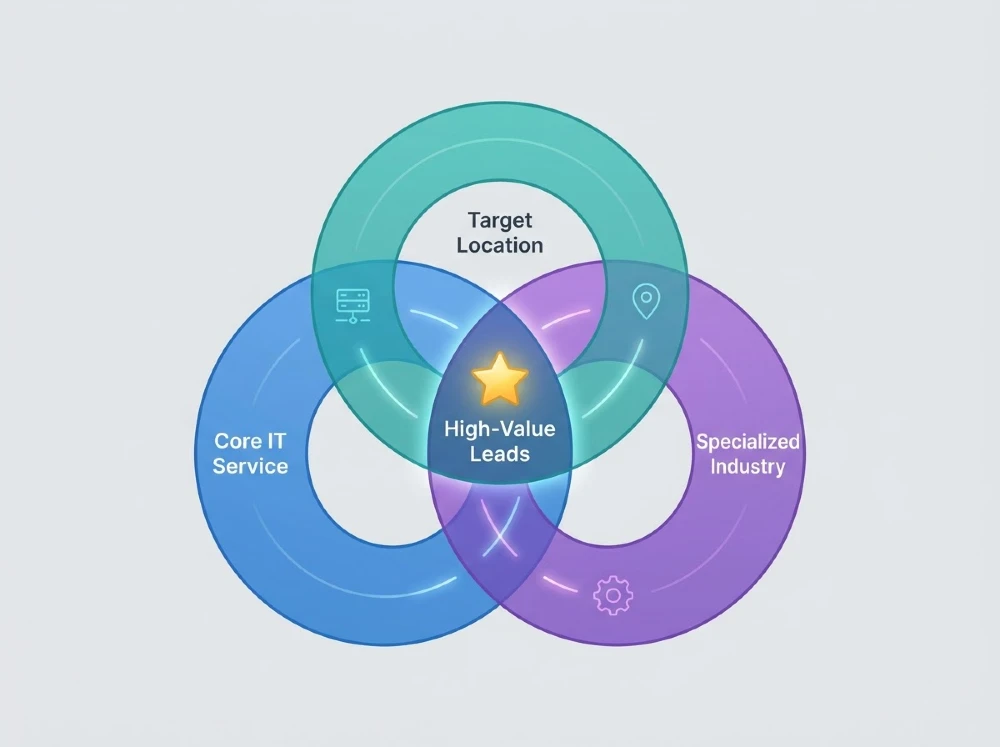
How MSP buyers actually search
MSP buyers rarely search using industry jargon. They search using plain, specific descriptions of a problem or a need, often with a location attached.
A business owner doesn’t type “managed services provider” out of nowhere. More often, the search starts one of two ways:
- Something already went wrong (“server keeps crashing,” “ransomware recovery help”)
- Leadership decided to switch providers (“best MSP near me,” “IT company for small business”)
Search intent also shifts depending on where the buyer is in their decision. Early on, they search for information (“what does an MSP do”). Later, they search with intent to buy (“managed IT services pricing,” “IT support company near me”). Recognizing this pattern is central to natural language processing-driven search Google’s algorithms match content to the meaning and intent behind a query, not just the exact words used.
Build keyword ideas from service + location + industry
The fastest way to generate a strong MSP keyword list is to combine three building blocks: the service you offer, the location you serve, and the industry you specialize in.
Take your core services (managed IT, cybersecurity, cloud support, help desk) and multiply them against your service area and your target industries. This single method can produce dozens of realistic, low-competition keyword ideas in under an hour.
Service + location examples
- “managed IT services Chicago”
- “IT support company in Phoenix”
- “cybersecurity services near me”
- “cloud migration company Dallas”
Service + industry examples
- “IT support for law firms”
- “managed IT services for healthcare”
- “cybersecurity for accounting firms”
- “help desk support for manufacturing”
Service + problem examples
- “MSP for HIPAA compliance”
- “IT company for ransomware recovery”
- “network monitoring for remote teams”
- “backup and disaster recovery for small business”
Combining these three variables (service, location, industry) mirrors how search engines build semantic relationships between related terms, a practice closely tied to LSI keywords and topical relevance. It also gives you a realistic keyword map instead of a list of vague, high-competition phrases.
How to tell buyer-intent keywords from informational keywords
Buyer-intent keywords include words that signal someone is ready to hire, request pricing, or compare providers. Informational keywords signal someone is still learning about a topic.
Here’s a simple way to tell them apart:
| Signal | Buyer-Intent Keyword | Informational Keyword |
| Wording | “managed IT services near me” | “what is a managed service provider” |
| Includes location | Often yes | Rarely |
| Includes pricing/comparison words | “cost,” “pricing,” “vs,” “best” | Rarely present |
| Search stage | Ready to contact a provider | Still researching |
Buyer-intent keywords typically include:
- Location terms (“near me,” a city name)
- Comparison words (“best,” “vs,” “top”)
- Action words (“hire,” “pricing,” “quote”)
Informational keywords usually start with “what,” “how,” or “why,” and the searcher is looking for an explanation, not a vendor. Both keyword types matter, but they belong in different parts of your website.
Which keywords deserve a service page
Buyer-intent keywords belong on service pages, because these searchers are close to making a decision and need a page that answers their question and gives them a way to contact you.
A service page should be built around one specific, high-intent keyword combination, such as “managed IT services for law firms in Boston.” Each service page needs:
- A clear headline matching the search term
- A short explanation of what’s included
- Proof points (client examples, certifications, response times)
- A visible call-to-action
Trying to rank one page for ten different services usually fails, because search engines struggle to match a broad page to a specific search. Separate pages for separate services almost always perform better.
Which keywords belong in blog content
Informational keywords belong in blog content, because these searchers want an explanation first, not a sales pitch.
Blog posts are the right home for:
- “What is a managed service provider”
- “How much does managed IT cost”
- “Signs your business needs a new IT provider”
These posts build trust and answer questions during the research phase. They also give search engines more content to associate with your site, using related terms and natural language that reinforce your topical authority in the IT services space. Well-written blog content lets your service pages rank for the harder, buyer-intent terms because the site as a whole looks like a credible source on the topic.
How to turn keyword research into topic clusters
A topic cluster is one main “pillar” page supported by several related blog posts, all linked together, so search engines see your site as a complete resource on the subject.
Here’s how to build one:
- Pick a pillar topic (example: “Managed IT Services for Small Business”)
- Create one strong pillar page targeting that core keyword
- Write supporting blog posts for related informational keywords
- Link every supporting post back to the pillar page
- Link the pillar page to related service pages
This structure supports semantic search the way modern search engines evaluate meaning and context across a group of pages, not just isolated keywords. A well-built cluster tells Google your site has depth on a topic, which tends to improve rankings for the whole group of pages, not just one.
How to choose the best first keywords to target
Start with keywords that have clear buyer intent, low-to-moderate competition, and a strong match to a service you already offer well.
A simple way to prioritize:
- List your core services and the cities or regions you serve
- Check competition by searching each term and seeing which competitors already rank
- Pick 3–5 keywords where you have a real service match and realistic ranking chance
- Build one strong page per keyword, not one page trying to cover everything
Avoid chasing high-volume, generic terms first. A smaller, specific keyword like “IT support company for dental offices in Tampa” will convert better and rank faster than a broad term like “IT services,” even though it gets less search volume.
Common MSP keyword research mistakes
The most common mistake is targeting broad, generic keywords instead of the specific phrases IT buyers actually type into Google.
Other frequent mistakes include:
- Ignoring location entirely most MSP clients hire locally or regionally, so skipping location keywords cuts off a large share of realistic searches
- Writing one page for every service this confuses search engines about what the page is actually about
- Copying competitor keyword lists without checking if those terms match your actual services
- Skipping informational content without blog posts to support service pages, a site has no way to build early trust with buyers who are still researching
Businesses that specialize in MSP SEO, like Miracle Concepts, build keyword strategy specifically around this sales cycle service, location, and industry combinations tied to real buyer behavior rather than reusing generic small-business SEO templates.
FAQs
One primary keyword per page, with two or three closely related supporting phrases. Trying to rank one page for many unrelated keywords usually backfires.
Only if you have a real, distinct market in each city. A shared regional page works fine for smaller or nearby service areas.
Most sites see initial keyword movement within 60 to 90 days, with meaningful lead growth following over the next few months, depending on competition and existing site content.
Relevance first. A lower-volume keyword that exactly matches your service and area will bring in better-qualified leads than a high-volume, generic term with no clear buyer intent.