
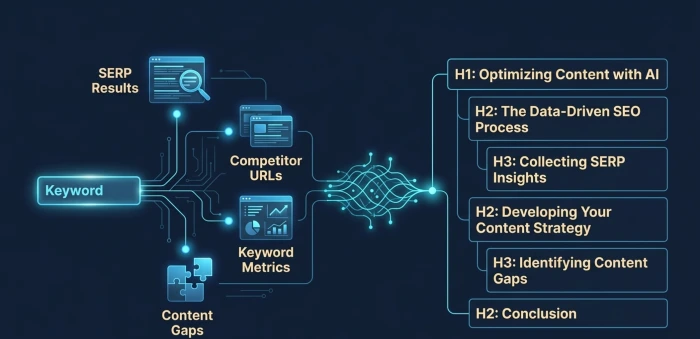
Most people using AI agents for content outlines are getting the same generic H2 lists that every competitor already has. The problem isn’t the AI it’s how they’re feeding it. An SEO AI agent builds a rankable content outline only when you give it real SERP data, a clear intent signal, and content gap instructions. Without those three inputs, you get structure that looks organized but has zero ranking advantage.
Quick Verdict
| What you need | What AI agent does with it |
| Target keyword + search intent | Identifies content format Google prefers |
| Top 5 SERP URLs | Finds what’s covered and what’s missing |
| Competitor heading map | Builds a differentiated heading structure |
| Your brand angle or unique data | Adds information gain to the outline |
| Word count range + audience type | Calibrates depth and reading level |
What an SEO AI Agent Actually Is (Not the Same as Asking ChatGPT)
Short answer: an SEO AI agent is a system that connects live data sources to an LLM and lets it take multi-step actions not just respond to a single prompt.
This distinction matters a lot for content outlines. When you paste a keyword into ChatGPT and ask for an outline, it draws entirely from its training data. No real SERP. No current rankings. No actual competitor analysis. The result is a structure that looks logical but has no relationship to what Google is currently ranking for that specific keyword.
An SEO AI agent is different because it can:
- Pull live search results for your target keyword
- Read and extract headings from the top-ranking pages
- Cross-reference your keyword against a database like Ahrefs or Semrush for related terms and search volume
- Identify which subtopics appear across multiple top-ranking pages (meaning Google considers them important for this query)
- Identify which subtopics are missing entirely (your content gap opportunity)
- Generate an outline that is built from that real data, not assumptions
The “agent” part means it does all of this in a sequence without you manually doing each step. You give it a keyword and a goal it runs the research, processes it, and produces the outline. That’s the meaningful difference from a single prompt.
Zapier automations or Make workflows are not agents. They run fixed, linear steps. An AI agent reasons. If a SERP result is behind a paywall and can’t be scraped, it finds an alternative. If the keyword has unclear intent, it evaluates the SERP mix before choosing a format. That adaptive reasoning is the key characteristic.
Discover AI SEO overflow strategies! Master generative search dominance with entity-rich content—capture AI citations exploding visibility as traditional clicks evolve into answer wins!
The Actual Inputs Your Agent Needs Before It Can Build a Useful Outline
Here’s where most people go wrong. They build an agent, point it at a keyword, and expect magic. The outline comes back generic because the agent had no direction beyond “write me an outline for X.”
A well-built SEO content outline agent needs five specific inputs to produce something you can actually use:
1. Target keyword and primary search intent
Not just the keyword the intent classification. Is this informational (the user wants to learn), commercial (they’re comparing options before buying), transactional (they’re ready to take action), or navigational (they want a specific site)? Intent determines the entire content format. An informational query on “SEO content outline” needs an educational guide. A commercial query on “best SEO outline tools” needs a comparison. If you don’t give the agent this signal, it guesses and it usually guesses wrong.
How to determine this before building the outline: search the keyword yourself, look at the top 5 results. If they’re mostly guides and tutorials, the intent is informational. If they’re mostly product pages or comparison articles, it’s commercial. That classification goes into your agent as a direct input.
2. Competitor URL list (minimum 3–5)
Your agent cannot analyse competitors it doesn’t know about. Give it the exact URLs of pages currently ranking in positions 1–5 for your keyword. The agent will crawl these, extract H2 and H3 headings, identify word count ranges, and map what topics each one covers.
Do NOT give it the top competitor if that competitor is using a very different format (like a video-heavy page with almost no text). That will skew the outline toward a format that won’t work for a text-based article. Filter for text-heavy editorial pages.
3. Your unique angle or data point
This is the most skipped input and the most important one. An outline without a differentiated angle produces the same article that’s already ranking. Google’s systems in 2026 look for information gain something the article adds that existing top pages don’t have.
Before you run the agent, decide: what does your article know or claim that competitors don’t cover? This could be a specific tool test result, a data point from your own analytics, a contrarian position on a commonly accepted claim, or a real use case from your experience. Feed this to the agent as an instruction: “This article must include a section covering [your unique point] that is absent from competitor content.”
Without this instruction, the agent builds a perfectly competent outline that adds nothing new.
Explore optimize blogs for generative AI search! Hacks like structured data and conversational queries get cited in AI answers—turn posts into traffic magnets thriving in ChatGPT era!
4. Target audience description
Beginner vs. advanced makes a structural difference. A beginner reading about SEO AI agent content outlines needs the foundational explanation of what an AI agent is before any workflow steps. An advanced practitioner needs to skip that and go straight to the technical build. If you don’t specify, the agent defaults to a generic audience, and the depth lands nowhere useful.
5. Intended word count range
An outline for a 1,500-word post looks structurally different from one for a 3,500-word guide. The agent needs this to calibrate how many H2s to include, how much depth each section should have, and whether supporting H3s are needed under each heading. Without it, the agent produces an outline that either leaves out critical sections or over-engineers a short piece.
Learn optimize for AI overviews! Structured lists, authoritative sources, unique insights dominate Google’s AI summaries—secure top positions in zero-click search revolution!
Step-by-Step: How to Build the SEO AI Agent Outline Workflow
This is the actual build process. The platforms being covered here are Gumloop (easiest for non-technical users), n8n (most flexible for technical teams), and Claude with MCP connections (best for individual SEO professionals who want a single-agent setup).
Step 1: Choose your platform and connect your data sources
For Gumloop: Go to gumloop.com, create a new flow, and connect your Semrush or Ahrefs account through their native integration panel. This gives the agent access to real keyword data search volume, keyword difficulty, related terms, and SERP feature data without you having to manually export anything. Also connect Google Search Console if you’re optimizing existing content rather than writing from scratch.
For n8n: Install n8n (cloud or self-hosted). Add an HTTP Request node configured to call DataForSEO’s API this is the data source that gives you live SERP results, competitor URLs, and related keyword data for any query. Then add an AI Agent node using Claude or GPT-4o as the LLM. The two nodes connect via JSON output from DataForSEO feeding directly into the agent node’s input.
For Claude with MCP: If you use Claude as your primary AI tool, connect it to the Ahrefs MCP server (available through Ahrefs’ developer documentation) and to a web scraping MCP like Firecrawl. This gives Claude the ability to pull live keyword data and read competitor pages directly in your conversation, turning a single Claude session into a lightweight agent workflow.
What NOT to do: don’t build your outline agent without a live data connection. A disconnected agent — one that has no access to current SERP data — is just a ChatGPT session with extra steps. All the effort of building the agent is wasted if the output is still based on training data from 2023.
Step 2: Build the SERP analysis node
This is the first action your agent takes after receiving a keyword. The SERP analysis node does one thing: it pulls the top 5–10 ranking pages for the target keyword and extracts their heading structure (H1, H2, H3).
In Gumloop, this is a pre-built template you configure it by specifying how many results to pull and which elements to extract (headings, word count, meta title). It runs in about 30 seconds per keyword.
In n8n, you build this manually using a DataForSEO HTTP Request node. Set the endpoint to /serp/google/organic/live/advanced, pass your keyword as the parameter, and configure the output to extract title, url, and items (which includes heading data when the page content is scraped). Use a second node to clean and structure this output before passing it to the LLM.
The output from this step should be a structured list: each competitor URL with its H2 headings listed underneath it. This is the raw material the agent uses to identify what topics are standard across the SERP and what’s missing.
Uncover what is generative engine optimization! GEO crafts content for AI answers not links—boost citations in Perplexity, ChatGPT skyrocketing brand authority click-free!
Step 3: Run the content gap analysis
With the competitor heading map in hand, the agent’s next instruction is: identify which topics appear in 3 or more of the top 5 pages (these are required sections Google considers them important for this query) and which topics appear in only 1 page or none (these are your differentiation opportunities).
The prompt structure for this instruction should be specific. A vague prompt like “find content gaps” gives vague output. A specific prompt works like this:
“You have the heading structure of the top 5 ranking pages for the keyword [keyword]. Identify: (1) H2 topics that appear in 3 or more pages these are must-cover sections. (2) H2 topics that appear in only 1 page these are potential differentiators. (3) Specific questions or subtopics that none of these pages directly address these are content gap opportunities. Output this as a structured list with clear labels.”
This gives you a map of what your outline must include, what it could include differently, and what it could include that nobody else covers. That three-way breakdown is the foundation of an outline with real ranking potential.
Step 4: Generate the outline with the differentiation instruction
Now the agent builds the actual outline. The instruction at this stage has to combine everything: the must-cover sections from step 3, the content gap opportunities, your unique angle from your inputs, your audience level, and your word count range.
This is the prompt structure that produces the best results not a generic “write me an SEO outline” instruction:
“Using the must-cover sections and content gap analysis, build a content outline for a [word count]-word [content format: guide/comparison/tutorial] targeting the keyword [keyword]. The target audience is [description]. Each H2 heading must be framed as either a problem the reader faces, a question they’re asking, or a direct solution not a generic topic label. Include one H2 that covers [your unique angle] this section must not duplicate anything in the competitor pages. For each H2, include 2–3 bullet points describing what that section will cover, not just what the heading says.”
The last instruction requiring 2–3 bullets under each heading explaining the content, not just the topic is what separates a useful outline from a useless one. “How to Build a Content Outline” as an H2 tells a writer nothing. “How to Build a Content Outline: covering the 5 inputs the agent needs, why generic outlines fail, and the exact prompt format to use” tells the writer exactly what to write. That specificity is what you’re asking the agent to produce.
Step 5: Validate the output before writing
Before any writer touches the outline, run a 3-point check:
Check 1 — Intent alignment: Does the overall structure match the content format Google is ranking? If Google is ranking step-by-step tutorials and your outline looks like a listicle, there’s a format mismatch. Fix the structure before writing starts.
Check 2 — Information gain present: Is there at least one H2 that covers something not present in the competitor analysis? If not, your outline will produce an article with zero information gain, and Google will crawl it but won’t rank it above what’s already there.
Check 3 — Heading language test: Read each H2 out loud. Does it sound like something a human would actually search for or a question they’d genuinely ask? Or does it sound like a topic pulled from a content marketing textbook? Headings like “The Importance of SEO Outlines” or “Key Benefits of AI Agents” are content padding in heading form. Headings like “Why Your AI Outline Has the Same Sections as Every Competitor” or “The Input Your Agent Needs That Nobody Mentions” answer a real question.
Review top 10 SEO tools boosting rankings! Ahrefs, SEMrush, Surfer SEO power semantic wins—equip arsenal dominating AI search with data-driven optimization mastery!
Why AI Outlines Fail to Rank (The Specific Reasons, Not the Vague Ones)
The honest reality is that most AI-generated outlines produce articles that get indexed but never rank in the top 10. There are specific, fixable reasons for this:
Problem 1: The outline mirrors the SERP instead of improving on it.
When an agent pulls competitor headings and then reassembles them in a slightly different order, the resulting article is structurally different but informationally identical. Google’s systems are sophisticated enough to identify when an article covers the same entity-topic map as existing pages. No ranking improvement comes from reorganizing the same information.
The fix: the content gap analysis step (Step 3) exists specifically to prevent this. If you skip it and go straight from competitor scraping to outline generation, you get a mirror. The gap analysis is what creates the differentiation instruction.
Problem 2: The headings are topic labels, not intent signals.
An H2 that reads “Content Outline Best Practices” is a topic. An H2 that reads “The Outline Step That Determines Whether Your Article Ranks or Just Gets Indexed” is an intent signal it promises to answer a specific question the reader has. Google’s NLP systems treat these differently. The second format aligns with how real search queries are phrased and gets treated as a direct answer candidate for related queries.
Problem 3: The outline has the right sections in the wrong order.
Content flow is a ranking factor indirectly, through dwell time and scroll depth. If your outline puts the most useful, specific content at section 7 of 10, most readers will leave before reaching it. The agent doesn’t naturally optimize for reader engagement unless you instruct it to order sections based on reader journey: problem recognition first, solution explanation second, specific how-to third, edge cases and caveats fourth.
Problem 4: The word count calibration is wrong.
AI agents default to either under-scoping or over-scoping outlines based on training data patterns. A keyword with informational intent and a competitive SERP usually needs 2,500–4,000 words of substantive coverage. An agent given no word count instruction might produce an outline that generates 1,200 words not enough depth to compete or 6,000 words of padded repetition. Both hurt. The word count input in Step 1 is what prevents this.
The Tools That Actually Work for This Workflow (With Honest Trade-offs)
Gumloop — Best for content teams and agencies. Pre-built Semrush integration, shareable agent templates, supports multiple LLM models (Claude, GPT-4o, Gemini, DeepSeek). You can build the outline workflow described above in about two hours without writing code. The trade-off: usage-based pricing scales quickly at high volume, and the sandboxed environment limits certain custom data connections.
n8n Best for technical teams who want full control. Open-source, self-hostable, connects to anything via API. The DataForSEO + Claude agent combination built in n8n gives you the most accurate real-time SERP data of any option. The trade-off: meaningful technical setup required. Someone on your team needs to understand API authentication, JSON data formatting, and node logic.
Claude with Ahrefs MCP — Best for individual SEO practitioners who work in Claude already. The Ahrefs MCP connection gives Claude live keyword data and SERP visibility directly in your session. You run the outline workflow as a conversation rather than a built flow. The trade-off: less repeatable than a built agent. Every outline requires you to manually guide the conversation through the steps. Good for occasional use; not efficient at scale.
Frase — A dedicated SEO content platform with an agentic layer built in. It handles SERP research, content briefs, and outlines in one workspace. The trade-off: it’s designed for a specific workflow and is less flexible than building your own agent. The output is high-quality for standard editorial content but harder to customize for unusual content formats or highly specific brand angles.
What to avoid: using Zapier or Make as an “AI agent” for outlines. These are workflow automation tools. They can trigger a ChatGPT API call, but the output is only as good as the fixed prompt you wrote. They don’t reason, adapt, or handle exceptions. The outline quality ceiling is much lower.
What a Good AI Agent Outline Looks Like vs. a Bad One
This comparison is based on testing the same keyword “content repurposing strategy” through two approaches: a basic ChatGPT prompt and a properly configured Gumloop agent with Semrush data and content gap analysis.
Basic ChatGPT output (no data):
- What is Content Repurposing?
- Why Content Repurposing Matters
- How to Repurpose Blog Posts
- Repurposing for Social Media
- Tools for Content Repurposing
- Tips for a Successful Content Repurposing Strategy
Generic. Every competing article has these sections. Zero information gain. No specific angle. No reader problem being addressed.
Agent output (with SERP data + gap analysis):
- The Content You Should Never Repurpose (And Why Repurposing It Wastes Budget)
- Which Formats Actually Drive Traffic When Repurposed (Based on Current SERP Data)
- The Three-Step Audit: Identifying Your Best-Performing Content Before You Repurpose Anything
- How to Repurpose a Single Blog Post Into 6 Distribution Formats Without Losing SEO Value
- The Platform-Specific Formatting Rules That Most Repurposing Guides Skip
- When Repurposing Hurts Rankings: Duplicate Content Risk and How to Avoid It
- Measuring Repurposing ROI: The Two Metrics That Actually Matter
Different structure. Different angle on every heading. Each one answers a specific reader question. The article this produces will cover ground competitors don’t which is the only path to ranking above them.
How to Use the Outline to Brief a Writer (Or Use It Yourself)
An outline is only useful if it’s specific enough to guide actual writing. The agent produces the structure. But before a writer starts, each H2 needs a 2–3 sentence brief: what the section covers, what specific claim or answer it delivers, and any data or examples to include.
This brief layer is what stops writers from interpreting “How to Build an SEO Content Outline” as permission to write anything broadly related to the topic. With a brief: “This section covers the 5 specific inputs the agent workflow needs keyword, intent, competitor URLs, unique angle, and word count. Explain each input, why it matters, and what happens if it’s missing.” The writer knows exactly what to produce.
If you’re writing it yourself, the brief serves as your writing prompt for each section. You’re not starting from a blank page you’re filling in a pre-specified answer to a pre-specified question. That’s faster, more focused, and produces content that matches the intent the outline was built around.
Frequently Asked Questions
It’s a content outline generated by an AI agent that uses live SERP data, competitor heading analysis, and content gap identification not just a response to a single prompt. The result is an outline built around what Google is actually ranking, what’s missing from those pages, and what your article can uniquely add.
Gumloop is the most accessible option for teams with Semrush data already set up. n8n with DataForSEO gives the most accurate real-time data but requires technical setup. Claude with Ahrefs MCP works well for individual practitioners. Frase is a good all-in-one option if you want a platform rather than a custom build.
You can, but without live SERP data, the outline is based on ChatGPT’s training data, not current rankings. It misses content gaps, can’t validate what Google is actually ranking, and produces generic structures. For competitive keywords, a data-connected agent produces significantly better outlines.
In Gumloop with native Semrush integration, roughly 2 hours for a first build. In n8n with DataForSEO, 4–6 hours depending on technical familiarity. Once built, running the workflow for a new keyword takes under 5 minutes.
No. Google’s guidelines target low-quality, unhelpful content not tools used in research or planning. Using an AI agent to analyse SERPs, identify content gaps, and structure an outline is closer to what a professional SEO does manually. Google’s systems evaluate the published content, not the workflow behind it.
Skipping the unique angle input. Without a differentiation instruction, the agent produces a competent version of what’s already ranking. That article will be indexed but not ranked above competitors who got there first. Information gain something your article adds that existing pages don’t have is not optional for competitive keywords.