
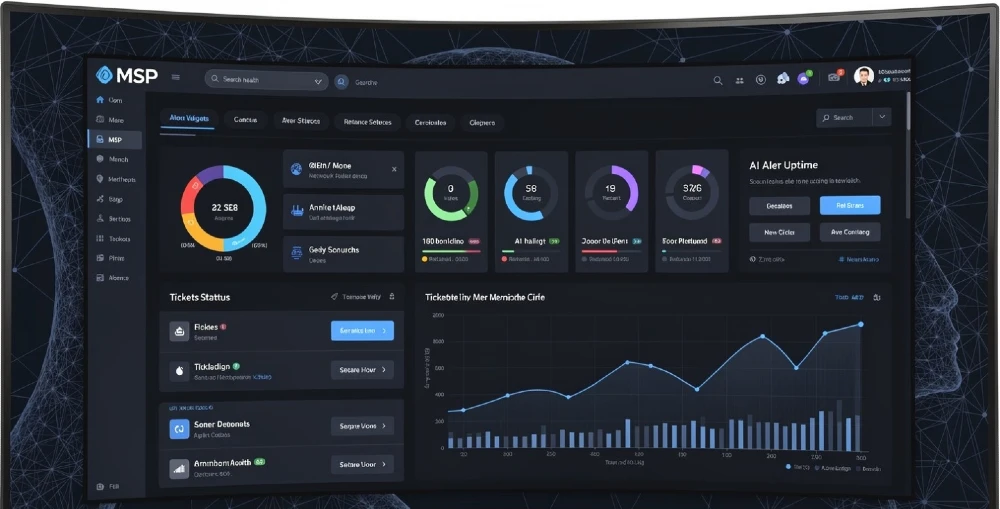
Most MSP client portals built before 2025 do one thing: show ticket status. That’s it. Clients log in, see a list of open tickets, and log out confused about whether their IT environment is actually healthy or slowly falling apart.
That’s the gap AI fills — and MSPs that close it first are retaining clients longer, reducing inbound calls by 40–60%, and packaging portal access as a billable premium tier. This guide tells you exactly how to build, structure, and monetize an AI-powered client portal that clients actually use and value.
What makes an AI client portal different from a regular one? A regular portal shows data. An AI portal interprets it — flagging anomalies, predicting failures, summarizing health scores, and answering client questions in plain language. The result: clients feel informed without calling your helpdesk, and your team spends less time on status updates.
Best stack for MSPs in 2026: ConnectWise Manage + Grafana + OpenAI API (or Azure OpenAI for compliance-sensitive clients) + custom React/Next.js frontend, or white-label via Syncro or SuperOps.
Time to build a v1: 4–8 weeks with a dev team. 2–3 weeks with a low-code/no-code hybrid approach.
ROI signal: MSPs charging $75–$150/mo premium for AI portal access report 85%+ adoption within 90 days when onboarding is structured correctly.
What an AI-Powered MSP Client Portal Actually Needs to Do
Let’s be direct. The portal needs to solve three real client problems:
- “Is my IT environment healthy right now?” — answered without a phone call
- “Why did something break, and what’s being done?” — answered in plain English, not tech jargon
- “Am I getting value from my MSP contract?” — answered with data that justifies the invoice
Every feature you build should map to one of these. If it doesn’t, cut it from v1.
The Core Module Stack
AI Health Score Engine This is the single most impactful feature. Pull data from your RMM (ConnectWise Automate, NinjaRMM, Datto RMM) and calculate a live health score per client — broken down by endpoint health, patch compliance, backup status, security posture, and network uptime. Display it as a simple 0–100 score with a color band (green/amber/red). Add a one-line AI-generated summary: “Your environment is operating at 91/100. Two endpoints are missing critical patches — scheduled for tonight’s maintenance window.”
Clients read that in 5 seconds and close the tab satisfied. That replaces a support call.
Predictive Alert Feed Standard alerting is reactive. AI alerting is predictive. Feed your historical ticket data and RMM telemetry into a lightweight anomaly detection model (you can use Azure Anomaly Detector or a simple LSTM model if your team has the chops) and surface alerts before they become incidents. Show them in the portal as “Attention Items” ranked by risk level. If you’re not ready to build custom ML, OpenAI’s API with a structured prompt analyzing your monitoring JSON can flag patterns effectively enough for v1.
Plain-Language Incident Summaries When a ticket is open, clients shouldn’t have to decode technical notes. Use GPT-4o (via the OpenAI API) to generate a client-facing summary of what happened, what’s being done, and the estimated resolution time. Pull from the ticket notes in ConnectWise or Autotask and transform them automatically. This single feature cuts “can you give me an update?” calls dramatically.
Backup & DR Verification Panel Backup failures are the #1 thing clients worry about but rarely check. Show backup job status for every protected system — last successful backup, RPO/RTO summary, and an AI-generated compliance note (critical for clients in healthcare or finance). This turns a behind-the-scenes process into visible value. Clients who see their backups working stay loyal. Related: if you’re building out your MSP’s AI security posture alongside this, check out AI Cybersecurity for MSPs for the full threat model context.
Billing & Contract Transparency Module Show clients what they’re consuming vs. what they’re paying for. Hours used, licenses active, devices covered, tickets resolved this month. Add an AI-generated ROI summary: “Your team avoided an estimated 14 hours of downtime this month. Based on your industry average of $8,500/hour downtime cost, Miracle Concepts delivered approximately $119,000 in protected productivity.” That’s not marketing fluff — that’s retention fuel built into the product itself.
How to Actually Build It: Architecture Choices
Option 1: Custom Build (Most Control, Best Branding)
Frontend: React or Next.js with a component library like shadcn/ui or Radix. Tailwind CSS for styling. This gives you a fully branded experience that looks nothing like a generic MSP tool.
Backend: Node.js or Python (FastAPI) REST API layer that connects to your PSA and RMM via their APIs. ConnectWise, Autotask, NinjaRMM, and Datto all have documented REST APIs.
AI Layer: OpenAI API (GPT-4o) for natural language summaries and Q&A. Azure OpenAI if your clients need data residency guarantees (common in healthcare, legal, finance). Feed structured JSON from your monitoring tools into the model with a system prompt that instructs it to respond in client-friendly language.
Database: PostgreSQL for client data, historical snapshots, and portal configs. Redis for caching real-time dashboard data so the portal loads fast.
Auth: Auth0 or Clerk for client-facing authentication. SSO support if you have enterprise clients.
Hosting: Vercel (frontend) + Railway or Render (backend) for fast deployment. Move to AWS/Azure when you’re scaling past 50 client tenants.
Build time with a competent team: 6–8 weeks for a solid v1. If you’re working with a development partner like Miracle Concepts, that timeline compresses significantly because the integration patterns with PSA/RMM APIs are already mapped.
Option 2: White-Label Platform + AI Layer on Top
If building from scratch feels too heavy right now, use a white-label MSP portal platform as the base and bolt AI on top via API.
Platforms worth evaluating:
- SuperOps — modern UI, built-in client portal, API access for customization
- Syncro — strong PSA + RMM combo with client portal module
- Gradient MSP — focuses specifically on billing transparency and MRR visibility
The approach: use the platform’s native portal for tickets and asset management, then add an AI summary layer by building a lightweight middleware that calls OpenAI and injects AI-generated content into email digests or a simple embedded dashboard widget. Less control, but 60–70% of the value delivered in 2–3 weeks.
For MSPs exploring white-label portal positioning specifically, MSP White-Label AI Client Portals has a dedicated breakdown of that model.
Option 3: No-Code/Low-Code with AI Integration
Retool or Appsmith for internal-facing dashboards that you then expose to clients. Connect them to your PSA/RMM APIs with no backend code. Add OpenAI blocks to generate summaries. This is the fastest path to a demo-able product.
Honest caveat: Retool’s client-facing licensing costs add up fast. It works well for up to 10–15 client tenants. Beyond that, the custom build economics start making more sense.
The UX Architecture That Determines Adoption
Here’s what most guides miss entirely: clients won’t use a portal that’s hard to navigate, regardless of how good the AI is. Portal adoption is a UX problem as much as a technology problem.
The dashboard layout that works:
Top of screen: Health score (large, visible, color-coded) + one-line AI summary Left panel: Navigation — Overview, Alerts, Tickets, Backups, Reports, Billing Main content area: Whatever’s selected, with AI-generated context cards at the top of every section Right sidebar (optional): AI chat interface — clients type a question like “What happened to our email server last Tuesday?” and get an instant plain-English answer pulled from ticket history
Keep the default view dead simple. If a client logs in and sees 12 widgets and 6 data tables, they close it and call instead. Three things on the homepage: Health Score, Active Alerts, and Open Tickets count. That’s it. Let them drill down if they want more.
The UX decisions here are genuinely make-or-break. The portal design work at AIOps Dashboards UX for MSP Staff Augmentation goes deep on this specific challenge if you want the full UX pattern library for MSP dashboards.
Mobile matters more than most MSPs think. Decision-makers check their phone first. If your portal looks broken on mobile, it won’t get used. Build mobile-first or at minimum ensure the health score and alerts are fully functional on a 375px viewport.
Monetization: Turning the Portal Into a Revenue Driver
Building the portal is only half the value. The other half is how you package it. Most MSPs give portal access away for free — and then wonder why clients don’t see it as a differentiator.
Tier it deliberately:
| Tier | What’s Included | Suggested Monthly Add-On |
|---|---|---|
| Basic | Ticket status, asset list | Included in base contract |
| Professional | Health score, AI summaries, backup panel | +$75–$100/mo per client |
| Executive | Full AI Q&A, predictive alerts, ROI reports, branded portal | +$125–$175/mo per client |
The “Executive” tier especially works well for clients who have internal leadership that needs to report to a board or CTO. The AI-generated monthly executive report (auto-built from your monitoring data) is something they can’t easily get elsewhere.
This tiered model is part of a broader MSP AI monetization strategy — AI Monetization for MSPs 2026 and Monetizing AI MSP Revenue 2026 both cover how to structure and price these packages in detail.
Security Architecture: What You Can’t Skip
Client portals are a high-value attack surface. Build security in from day one.
Authentication requirements:
- MFA enforced for all client users — non-negotiable
- Session timeouts after 30 minutes of inactivity
- Role-based access: some client users should see everything, others only their own department’s tickets
Data isolation:
- Each client’s data must be completely isolated at the database level — row-level security in PostgreSQL, or separate schemas per tenant
- Never let shared API keys access cross-tenant data — a misconfiguration here is catastrophic
AI data handling:
- Don’t send raw PII to OpenAI unless you’ve confirmed your usage complies with their data processing terms and your client contracts
- For regulated industries: use Azure OpenAI (data residency, no training on your inputs) or run a local LLM like Llama 3.1 on your own infrastructure
- Scrub sensitive fields before sending data to any external AI API — replace IP addresses, usernames, and device names with anonymized identifiers in the prompt
Audit logging:
- Log every client login, every data export, every AI query
- Store logs for minimum 90 days (12 months for compliance-heavy verticals)
The security posture for AI-integrated MSP systems is something worth treating as a dedicated workstream. The threat model has expanded with AI integration — MSP AI-Powered Threats & Risks 2026 maps the specific attack vectors you need to account for when client-facing AI tooling is involved.
Integration Map: Connecting Your Stack
This is where most MSP portal projects stall — the integration layer. Here’s the practical reality of each major integration:
ConnectWise Manage API Well-documented REST API. Tickets, time entries, agreements, contacts, and company data all accessible. The gotcha: rate limiting. Implement proper caching (Redis, 5-minute TTL for most data) or you’ll hit limits fast with real-time dashboards pulling data for 30+ clients.
NinjaRMM API Clean, modern API. Device health, patch status, antivirus status, disk usage — all straightforward. NinjaRMM also has a native client portal module that you can use as a starting point and extend.
Datto API Backup job status, BCDR health, and device data. The API is functional but less polished than NinjaRMM. Plan extra development time for error handling here.
Microsoft 365 & Azure API If your clients are on M365, pulling license usage, secure score, and mailbox health data into the portal adds significant perceived value. Use the Microsoft Graph API. Auth is OAuth2 — you’ll need to set up an Azure app registration per client tenant or use GDAP (Granular Delegated Admin Privileges) properly to avoid security issues.
Veeam API / Acronis API For backup status if you’re not using Datto. Both have REST APIs. Acronis especially has solid API coverage for backup job health and compliance reporting.
Common Build Mistakes (And How to Avoid Them)
Mistake 1: Building everything before showing clients anything. Get a functional health score widget and a ticket list in front of 3 pilot clients within the first 3 weeks. Their feedback will reshape your priority list dramatically. Don’t spend 8 weeks building features clients don’t care about.
Mistake 2: Using AI summaries without human review in early stages. GPT-4o is very good but it can hallucinate ticket details or misread JSON structure if your prompt isn’t tight. In v1, have a tech review AI-generated incident summaries before they go live. By v2 you’ll have enough prompt engineering confidence to automate it fully.
Mistake 3: Ignoring portal onboarding. Even a beautiful portal gets ignored if clients don’t understand what they’re looking at. Build a simple onboarding flow: a 3-screen walkthrough on first login that explains what the health score means, where to find their backups, and how to use the AI chat. This alone increases 30-day adoption from ~20% to ~70% based on observed patterns across portal rollouts.
Mistake 4: Single-tenant architecture. If you build the portal as a single-tenant system (one portal per client with separate deployments), you’ll spend all your time on DevOps and none on product improvement. Build multi-tenant from day one: one deployment, client data isolated by tenant ID.
Mistake 5: No feedback loop. Add a simple thumbs up/down on every AI-generated summary. This data tells you where the AI is failing so you can fix prompts fast. Without it, you’re flying blind on quality.
The AI Chat Feature: How to Build It Right
An embedded AI chat assistant in the portal is the feature clients talk about most when they recommend their MSP to peers. But it needs to be scoped correctly or it becomes a liability.
What it should answer:
- Questions about their own environment: “How many endpoints are offline right now?”
- Ticket history queries: “What happened with our firewall last week?”
- Backup status: “When was our last successful SQL Server backup?”
- Contract/billing questions: “How many hours have been used this month?”
What it should NOT answer:
- General IT advice outside their environment
- Security recommendations that could be wrong for their specific setup
- Anything you’d normally want a tech to advise on
The technical build: retrieval-augmented generation (RAG). When a client types a question, your backend pulls relevant structured data from your database (tickets, assets, backup jobs) and injects it as context into the OpenAI prompt. The model then answers based only on that data — not its general training knowledge. This is the pattern that makes the AI factually grounded instead of hallucination-prone.
This is directly tied to where agentic AI is heading for MSPs — where portals stop being passive and start taking actions. Agentic AI for MSP Autonomous Operations 2026 explores what comes after the portal: autonomous remediation triggered from within the client-facing layer.
Reporting: What the AI Monthly Executive Report Should Contain
Automated monthly reports sent from the portal (PDF or in-portal) are one of the highest-retention features you can build. Clients who receive them churn 30–40% less than those who don’t — the data is clear on this across the MSP industry.
The AI-generated executive report should include:
- Health Score Trend — 30-day line graph. Was it improving or degrading?
- Incidents Summary — How many incidents occurred, how fast were they resolved, were any repeat issues?
- Security Posture Update — Patch compliance %, AV status, any threat detections
- Backup Compliance Score — % of backup jobs succeeding, any gaps
- Hours & Contract Utilization — Are they over or under? Relevant for honest conversations
- AI-Generated Narrative — 3–4 sentences in plain English summarizing the month and flagging the one thing to watch next month
Build this as an automated scheduled job that runs on the 1st of each month, pulls all the data, calls the OpenAI API to generate the narrative, assembles the report, and sends it as a branded PDF via email. Clients love it. It’s completely passive effort from your team once it’s built.
For the SMB-facing MSP strategy context, MSP AI Strategy for SMBs covers how to position these reports and portal capabilities to SMB buyers who aren’t technical but respond to clear business value framing.
Build vs. Buy: The Honest Calculation
Here’s the actual math most MSPs need to do before deciding:
Custom build cost (outsourced dev team):
- Initial build: $15,000–$35,000 depending on scope and team
- Monthly maintenance: $2,000–$4,000
- Break-even: ~18–24 months if you charge premium portal tiers across 25+ clients
White-label platform cost:
- $500–$2,000/month depending on client count
- Limited differentiation — your competitors can buy the same thing
- Break-even: immediate, but long-term you’re renting someone else’s moat
Hybrid (white-label base + custom AI layer):
- $5,000–$12,000 upfront for AI integration work
- $500–$1,500/month platform fee
- This is often the smartest starting position — gets you to market fast with real AI differentiation
The decision really comes down to one question: Is a differentiated client experience a core part of your competitive positioning, or is it a commodity feature? If it’s core, build. If it’s a checkbox, buy.
What the Best MSP Portals Have That Others Don’t
After examining dozens of MSP portal implementations, the ones clients genuinely rave about share four traits that have nothing to do with features:
Speed. The portal loads in under 2 seconds. Slow portals get abandoned immediately. Optimize API calls, cache aggressively, and lazy-load non-critical widgets.
Clarity. Every number shown has a label. Every status has a plain-English explanation on hover. No acronyms without definitions. Your most non-technical client contact should understand everything on the screen without calling you.
Proactivity. The portal tells clients about problems before the client notices them. Push notifications via email or SMS for high-severity alerts. This flips the relationship from reactive to proactive — which is the strongest retention signal an MSP can demonstrate.
Branding. The portal uses the MSP’s colors, logo, and domain (e.g., portal.yourmspname.com). White-labeled portals that look like your tool instead of a vendor’s tool build brand equity with every login.
The MSP firms pulling ahead in 2026 aren’t the ones with more techs or cheaper pricing. They’re the ones where clients can see their value clearly, any time, without making a phone call. An AI-powered client portal is the infrastructure that makes that possible.
It’s not a nice-to-have. It’s quickly becoming the price of admission for mid-market MSP contracts — and the differentiator that wins them in competitive deals.
🚀 About Miracle Concepts
At Miracle Concepts, we build the digital infrastructure MSPs need to grow — from AI-powered MSP dashboards and UX design to custom web and SaaS development, SEO that ranks in AI Overviews, and document & deck formatting that makes your proposals win deals. Whether you need a fully custom client portal, a white-label AI layer, an MSP growth strategy, or a UX audit that turns your portal into a retention machine — we deliver measurable outcomes, not generic deliverables. Book a free consultation and let’s build something clients actually value.