
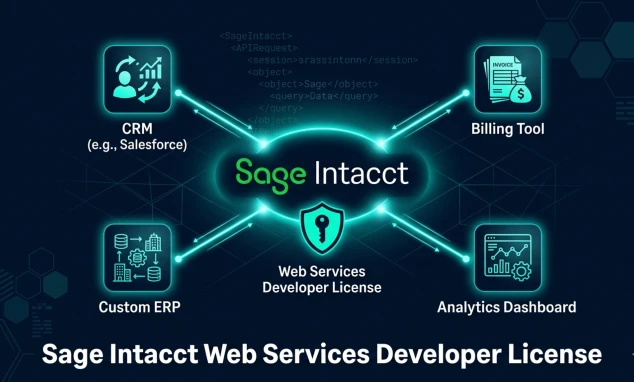
If you are trying to connect an external application to Sage Intacct and hitting a wall this is the guide you need. Whether your goal is syncing your CRM, automating invoice creation, building a custom reporting layer, or pulling real-time financial data into another tool, it all starts with one thing: the Sage Intacct Web Services Developer License.
Without it, nothing talks to Sage Intacct programmatically. Full stop.
Quick Answer: The Sage Intacct Web Services Developer License is a credential provisioned by Sage Intacct that gives your application authorized, secure access to Sage Intacct’s XML/SOAP API. It includes a Sender ID and password the two identifiers your integration uses to authenticate every API call. You request it through your Sage Intacct account manager, and once active, you use it to connect any authorized third-party application, custom integration, or automation workflow to your Sage Intacct environment.
TL;DR — Quick Reference Table
| Item | Detail |
| What it is | An API access credential for Sage Intacct’s XML Web Services |
| What it includes | Sender ID + Sender Password |
| How to get it | Contact your Sage Intacct account manager |
| API type | SOAP-based XML API |
| Primary endpoint | https://api.intacct.com/ia/xml/xmlgw.phtml |
| Authentication types | Login authentication or Session authentication (recommended) |
| Does it expire? | No — valid as long as your Sage Intacct subscription is active |
| Can one Sender ID cover multiple companies? | Yes — must be authorized per company |
What Is the Sage Intacct Web Services Developer License?
Direct answer: It is a licensed API credential that allows developers and third-party systems to programmatically access, create, update, read, and delete data inside a Sage Intacct company, using Sage Intacct’s XML-based Web Services API.
Sage Intacct is a cloud-based ERP and financial management platform built specifically for mid-market organizations. It handles general ledger, accounts payable, accounts receivable, project accounting, multi-entity consolidation, and more. It is powerful inside its own UI but for businesses that run multiple software systems, the real value comes from connecting Sage Intacct to those other tools.
That connection requires the Web Services Developer License.
Think of it this way: the license is the door key. The Sender ID and password it provides are the credentials your application uses every time it knocks on Sage Intacct’s API door. Without them, the door does not open no matter how good your code is.
The license is issued by Sage Intacct to customers and partners who have an active subscription and a legitimate need for API access. It is not a generic API key that anyone can generate. It is specifically provisioned, and each Sender ID is tracked through an audit history meaning Sage Intacct knows exactly which application made which API calls at what time.
This matters for compliance, security, and troubleshooting.
Discover how APIs work in web development! Seamless data exchange powers dynamic apps—unlock payment gateways, maps, social features accelerating feature-rich sites instantly!
Who Actually Needs a Sage Intacct Web Services Developer License?
Direct answer: Any developer, IT team, or integration platform building a connection between Sage Intacct and an external system needs this license. That includes custom ERP integrations, CRM syncs, third-party middleware platforms like Make (formerly Integromat), and internal automation tools.
The practical scenarios where you will need this license:
Custom integrations between Sage Intacct and your CRM If you use Salesforce, HubSpot, or any other CRM and want financial data (invoice status, account balances, payment history) to flow automatically without manual exports, your integration layer needs authenticated API access. That means a Web Services Developer License.
Automated billing and invoicing If your business generates high volumes of invoices from a custom order management system, e-commerce platform, or subscription billing tool, you likely want those invoices to appear in Sage Intacct automatically not entered manually. The license lets your billing system push invoice data directly to Sage Intacct via the API.
Third-party platforms like Make, Zapier, or Boomi These platforms have pre-built Sage Intacct connectors but to use them, the Sage Intacct side still requires an active Web Services Developer License. If you try to connect Make’s Sage Intacct module without the license active, the authentication will fail.
Custom financial reporting tools Some organizations pull raw Sage Intacct data into Power BI, Tableau, or custom analytics dashboards. Reading data from Sage Intacct via API requires the same authenticated license.
Internal automation workflows If your procurement team wants purchase orders submitted in an internal system to automatically create bills in Sage Intacct, that workflow requires API access.
One thing to clarify: if you are simply using Sage Intacct’s native UI to run reports, manage transactions, and handle day-to-day accounting you do not need the Web Services Developer License. That license is specifically for external application access via API. It is a developer and integration credential, not a standard user account.
How to Get the Sage Intacct Web Services Developer License
Direct answer: Contact your Sage Intacct account manager and request the Web Services Developer License. They will provision a Sender ID and Sender Password for you. You then enable the Web Services subscription in your Sage Intacct company settings and authorize your Sender ID for the target company.
Here is the complete process from request to first API call:
Step 1 — Request the License From Your Account Manager
Pick up the phone or send an email to your Sage Intacct account manager. Tell them you need a Web Services Developer License for integration development. They will process the request and provision the credentials.
If you are unsure whether your organization already has a license, check your latest Sage Intacct invoice. Look for a line item called “Intacct Web Services Developer License.” If it is there, you have it. If not, you need to add it.
Once provisioned, Sage Intacct sends your sender password by email. Save it immediately and store it securely. If you lose it, you will need to open a support ticket to request a password reset — and that reset will break any existing integrations using that Sender ID until they are updated with the new password.
Step 2 — Enable the Web Services Subscription in Your Company
Log in to Sage Intacct as an administrator. Navigate to:
Company → Admin → Subscriptions
Scroll to the bottom of the subscriptions list and find “Web Services.” Enable it. This activates the Web Services capability for your specific Sage Intacct company (tenant). This step is required even if you already have the developer license the subscription must be enabled per company.
Step 3 — Authorize Your Sender ID for the Company
After enabling the subscription, you need to authorize your specific Sender ID to interact with this company’s data. Navigate to:
Company → Setup → Company (under Configuration) → Security Tab → Web Services Authorizations
Click “Add” and enter:
- Sender ID — the ID provisioned by your account manager
- Description — a name for the integration (e.g., “CRM Integration” or “Billing Automation”)
Click Save. Your Sender ID is now authorized to make API calls to this specific company.
Important: a single Sender ID can be authorized for multiple Sage Intacct companies. If you are a partner or marketplace developer building integrations for multiple clients, your Sender ID works across all of them but each client company must individually authorize it through their own Security settings.
Step 4 — Create a Dedicated Web Services User Account
This step is critical and often skipped by teams in a hurry. You need a dedicated Web Services user account in Sage Intacct separate from your personal login specifically for your integration to authenticate with.
Navigate to:
Company → Admin → Web Services Users → Add
Create the user with:
- A descriptive User ID (e.g., “api_integration_user” or “crm_sync_user”)
- An email address for the account (you will receive the password there)
- User type: Business (required for full data access)
- Role: Admin is recommended if your integration needs full object access
Why a dedicated Web Services user and not a regular employee account? Three reasons:
- Security — the integration uses its own credentials, isolated from any individual employee’s account. If an employee leaves, their personal account gets deactivated, which would break the integration.
- Audit clarity — all API transactions made by the integration are tracked under the Web Services user ID, making audit trails clean and easy to trace.
- Permission management — you can set exactly the permissions the integration needs, applying the principle of least privilege without constraining what human users can do.
Explore operating system optimized for web apps! Linux lightweight efficiency crushes for servers—Chrome OS perfect web-centric client-side dominating modern development!
Step 5 — Authenticate and Make Your First API Call
Once you have your Sender ID, Sender Password, Web Services User ID, User Password, and Company ID you have everything you need to authenticate.
Sage Intacct’s API uses two authentication methods:
Login authentication: You pass your company ID, user ID, and password in every request. Simple but not recommended for production it creates overhead and exposes credentials more frequently.
Session authentication (recommended): You call getAPISession once, which returns a temporary Session ID and a unique endpoint URL. You then use that Session ID for all subsequent calls in the session. Session IDs expire based on inactivity, so your application should request a new session at the start of each workflow.
The API endpoint is always: https://api.intacct.com/ia/xml/xmlgw.phtml
All requests are HTTP POST. HTTP GET requests are not supported and have been blocked since January 15, 2023.
Understanding the Sage Intacct XML API Structure
Direct answer: Sage Intacct’s Web Services API uses SOAP-based XML requests and responses. Every API call is an XML document sent via HTTP POST to a single gateway endpoint. The XML has a defined structure with control blocks (for sender authentication), operation blocks (for company authentication), and content blocks (for the actual API functions).
If you have worked with REST APIs, Sage Intacct’s XML API feels different. Most modern APIs use JSON over HTTP. Sage Intacct uses XML over HTTP POST. It is older in style but extremely stable — the same API patterns have been supported for over a decade.
Here is the basic structure of every XML request:
<?xml version=”1.0″ encoding=”UTF-8″?>
<request>
<control>
<senderid>YOUR_SENDER_ID</senderid>
<password>YOUR_SENDER_PASSWORD</password>
<controlid>unique-request-id-12345</controlid>
<uniqueid>false</uniqueid>
<dtdversion>3.0</dtdversion>
</control>
<operation>
<authentication>
<sessionid>YOUR_SESSION_ID</sessionid>
</authentication>
<content>
<function controlid=”func-001″>
<!– Your API function goes here –>
</function>
</content>
</operation>
</request>
Let us break down each block:
The <control> block — this is where your Sender ID and password go. This authenticates your application (the integration) to Sage Intacct’s gateway. The controlid is a unique identifier you generate for each request use a GUID or sequential ID. The dtdversion should always be 3.0, which is the current version and provides access to all modern API functions.
The <operation> block — this contains your company authentication (the session ID or login credentials) and the actual API function calls. Everything inside <content> is what you are asking Sage Intacct to do.
The <function> element — this is the actual API call. It could be a create to add a new bill, a read to fetch a vendor record, an update to change an invoice, or a delete to remove a record.
Two categories of API functions exist:
- Generic functions (create, read, update, delete, query) — these are the modern, recommended functions that work across multiple object types
- Object-specific / legacy functions (createBill, getBill, etc.) older functions that will not receive new enhancements. Use generic functions for new development.
One key behavior to understand: transaction integrity. You can group multiple function calls inside a single operation element and set transaction=”true”. This means all the functions succeed or fail as a single unit. If one fails, all previous executions in that operation roll back. This is essential for workflows where multiple related records need to be created together for example, creating a bill header and its line items simultaneously.
Common Integration Errors and How to Fix Them
Direct answer: The most common errors are unauthorized Sender ID, wrong authentication sequence, session timeout, concurrency limit exceeded, and SSL certificate issues. Each has a specific fix — knowing them in advance saves hours of debugging.
Error: “The sender ID is not authorized to make Web Services requests to company ID”
Cause: Your Sender ID has not been added to the Web Services Authorizations list for that specific company.
Fix: Go to Company → Setup → Company → Security → Web Services Authorizations and add your Sender ID. This must be done per company. If you are integrating with multiple Sage Intacct companies (multi-entity setup), each company needs to authorize your Sender ID separately.
Error: Authentication Failure / Invalid Credentials
Cause 1: Sender ID or password entered with incorrect casing. Both are case-sensitive.
Cause 2: The Web Services subscription is not enabled for the company. Double-check Company → Admin → Subscriptions and confirm Web Services is active.
Cause 3: The Web Services user account password was recently reset, but the integration is still using the old password.
Fix: Verify exact casing for all credentials. Confirm the subscription is enabled. Update passwords in your integration configuration when they change.
Error: Session Timeout / Session Expired
Cause: Your application made API calls using a session ID that has expired due to inactivity.
Fix: Always call getAPISession at the start of each integration workflow to get a fresh session ID and endpoint. Do not cache session IDs across long periods of inactivity. The API response for every call includes a projected session timeout timestamp read this and refresh before it expires.
Error: Gateway Concurrency Limits
Cause: Sage Intacct limits concurrent connections per company (tenant). If your integration sends 100 simultaneous requests, only a small number process immediately the rest queue and wait roughly 5 seconds before processing.
Fix: Design your integration to process records sequentially or in small batches, not in massive parallel bursts. For large data imports, paginate and throttle your requests. Sage Intacct recommends limiting queries to fewer than 1,000 records and paginating results.
Error: SSL Certificate / Connection Security Error
Cause: Your integration server has a hardcoded SSL certificate for Sage Intacct subdomains that has since been updated.
Fix: Do not hardcode SSL certificate authority files in your integration code. Use a standard certificate authority approach that handles certificate updates automatically. This catches all Sage Intacct subdomains (*.intacct.com) without manual certificate management.
Error: HTTP GET Request Blocked
Cause: Your application is sending GET requests to the API gateway. Sage Intacct blocked all HTTP GET requests as of January 15, 2023.
Fix: All API calls must use HTTP POST. If your integration was built before 2023 and uses GET, update it to POST.
Using the Sage Intacct SDKs vs. Raw XML
Direct answer: Sage Intacct provides official SDKs for PHP and Java, plus a community-supported .NET SDK, that wrap the raw XML API in cleaner, object-oriented code. For most development teams, using an SDK reduces development time, handles XML construction automatically, and manages session authentication for you making it the right choice over writing raw XML manually.
Writing raw XML API calls is completely valid and understanding the underlying XML structure (covered above) is important regardless of which approach you take. But in practice, most developers benefit from using an SDK.
Here is what the SDK handles automatically:
- XML request construction (you work with objects and method calls, not raw XML strings)
- Session ID management (the SDK handles getAPISession and session refresh)
- Error parsing (structured exception handling instead of parsing XML error responses manually)
- Response parsing (typed response objects instead of raw XML parsing)
The official Sage Intacct SDKs are available on GitHub. The PHP SDK is the most actively maintained of the official options. The .NET SDK is community-supported and widely used for Microsoft-stack integrations.
If you are building a quick one-off integration or script, the Postman collection approach (covered in Sage Intacct’s developer documentation at developer.intacct.com) lets you test API calls directly without writing code first. This is a good way to validate your credentials, test specific API functions, and understand response structures before investing development time.
What to do: Start with Postman to validate credentials and understand the API. Then choose the SDK that matches your stack PHP SDK for PHP-based systems, community .NET SDK for Microsoft environments, or raw XML for any language with an HTTP library.
What not to do: Do not write raw XML in production code without extensive error handling. XML construction errors are silent in some implementations a malformed request gets rejected with a generic error and gives you no indication of where the XML broke. SDKs eliminate this class of error.
Master how web development affects SEO! Core Web Vitals, structured data, crawl efficiency drive rankings—build technically perfect sites dominating search profitably!
What Can You Actually Do With the Web Services API?
Direct answer: Through the API, you can create, read, update, and delete virtually every standard object in Sage Intacct including bills, invoices, vendors, customers, journal entries, purchase orders, projects, employees, expense reports, and more. You can also query objects with filters, work with multi-entity setups, and create custom objects through Platform Services.
Here is a practical breakdown of the most commonly used integration patterns:
Syncing vendor/supplier data from an external procurement system A procurement platform creates or updates a vendor record in its own system. Your integration reads that change and uses the Sage Intacct API to create or update the corresponding VENDOR object in Sage Intacct. Result: vendor master data stays synchronized without manual duplicate entry.
Automated invoice/bill creation from external billing systems Your subscription billing platform (Chargebee, Stripe Billing, Zuora) generates an invoice. Your integration receives that event and uses the API to create an ARINVOICE (accounts receivable invoice) in Sage Intacct with the correct line items, amounts, currency, and customer reference. No manual entry required.
Real-time project cost tracking Your project management tool logs time and expense entries. Your integration pushes those entries to Sage Intacct as project transaction lines, updating the project’s financial picture in real time. Your project managers see live budget vs. actuals without waiting for the finance team to manually enter data.
Multi-entity consolidation automation For organizations with multiple subsidiaries in separate Sage Intacct entities, inter-entity transactions that would require manual journal entries in each entity can be automated via API the integration creates the corresponding entries across entities simultaneously.
Custom financial dashboard data feeds A business intelligence tool needs up-to-date financial data (GL balances, AR aging, AP aging, budget vs. actuals) to build executive dashboards. Instead of scheduled CSV exports, the BI tool queries Sage Intacct directly via API and pulls current data on demand.
What not to do: Do not use the API to pull large datasets in a single query. Sage Intacct’s API handles this through pagination queries return a maximum of 100–1,000 records per call depending on the object. Always implement pagination logic in your integration for any query that might return more than 100 records.
The Sandbox Environment: Test Before You Break Production
Direct answer: Sage Intacct provides a sandbox environment where you can test all API calls safely against dummy data before deploying anything to your production company. Always use the sandbox during development testing against production data risks of creating real financial records, corrupting live data, and triggering real accounting workflows.
Setting up your sandbox:
- Contact your Sage Intacct account manager to request a sandbox company. It mirrors your production setup but contains test data only.
- Configure the same Web Services subscription and Sender ID authorization in the sandbox company that you have in production.
- Create a dedicated Web Services user in the sandbox with test credentials.
- Set up a separate Postman environment (or integration configuration) for sandbox vs. production, so you never accidentally point your test calls at live data.
Practical sandbox testing rules:
- Test every API function with valid data, invalid data, and edge cases (missing fields, wrong data types, boundary values)
- Test transaction rollback behavior — submit a multi-function operation where the last function is intentionally invalid. Verify that all previous functions in the operation rolled back correctly.
- Test concurrency behavior if your integration sends high volumes deliberately send 50+ requests simultaneously and verify your error handling for queued requests behaves correctly
- Test session expiry — let a session ID expire and confirm your integration requests a new session correctly rather than failing silently
- Test with the same data complexity you will face in production if your production invoices have 50 line items, test with 50 line items, not 3
What not to do: Do not skip sandbox testing because “it is just a simple integration.” The most common production incidents in Sage Intacct integrations come from untested edge cases a vendor name with a special character that breaks XML parsing, a transaction amount in an unexpected currency, a field that is required in some entity configurations and optional in others. The sandbox is where you find these problems at zero cost.
Launch full stack web dev for SaaS products! End-to-end multi-tenant architecture scales subscriptions—API mastery fuels recurring revenue growth exponentially!
Multi-Company and Marketplace Partner Use Cases
Direct answer: A single Sage Intacct Web Services Sender ID can be used to integrate with multiple Sage Intacct companies as long as each company’s administrator authorizes that Sender ID in their Web Services settings. This is the standard pattern for Sage Intacct Marketplace Partners building commercial integrations.
If you are an independent software vendor (ISV) building an integration that your customers will use within their own Sage Intacct accounts, here is how the licensing model works:
Your company obtains one Sender ID through the Sage Intacct Partner Program. You use that Sender ID in your integration product. When a customer wants to use your integration, their Sage Intacct administrator goes to Company → Security → Web Services Authorizations and adds your Sender ID. Your integration can then make API calls to that customer’s company.
The Sender ID is the identifier Sage Intacct uses to track which marketplace partner is making which calls. Audit history reports show all API activity by Sender ID so both you and your customer can see a complete record of every API transaction your integration has made.
For organizations managing multiple internal Sage Intacct companies (e.g., a parent company with multiple subsidiaries each in their own Sage Intacct entity), one Sender ID covers all of them. Each entity must authorize the Sender ID in its own settings, but you use the same credentials across all of them.
Security Best Practices for Your Sage Intacct Integration
Direct answer: Store your Sender ID and password in environment variables or a secrets manager — never hardcode them in source code. Use session authentication instead of login authentication in production. Apply the principle of least privilege to your Web Services user account. Rotate passwords periodically and update integrations accordingly.
Security is not optional when your integration has programmatic access to financial data. Here is the practical security framework:
Credential storage: Never put your Sender ID, Sender Password, or Web Services user credentials in your source code. Use environment variables, AWS Secrets Manager, Azure Key Vault, or an equivalent secrets management tool. This ensures credentials are not accidentally committed to version control and can be rotated without code changes.
Use session authentication: Login authentication sends credentials in every request. Session authentication sends credentials once to get a session ID, then uses the session ID for subsequent calls. From a security exposure standpoint, session authentication reduces how often your primary credentials travel over the network.
Validate session endpoints: When you receive a session ID and endpoint from getAPISession, verify that the endpoint domain ends in .intacct.com before using it. Do not blindly trust session endpoints received over the internet this prevents potential session hijacking through endpoint manipulation.
Web Services user permissions: Assign only the permissions your integration actually needs. If your integration only creates bills and reads vendor records, it does not need permissions to delete journal entries or manage user accounts. Apply least privilege restrict the Web Services user to exactly the modules and functions required.
Password rotation: Plan for periodic password rotation. When you rotate the Sender Password, every active integration using that Sender ID must be updated simultaneously. If you manage multiple integrations sharing one Sender ID, document them all so no integration gets left with a stale password after a rotation.
Monitor the audit trail: Sage Intacct tracks all Web Services activity by Sender ID in its audit history reports. Review these periodically. Unexpected API call volumes, unusual times of activity, or calls to objects your integration should not be touching are all signals worth investigating.
Discover custom web design services! Bespoke UI/UX converts 3X better than templates—craft brand-perfect experiences boosting engagement dramatically!
Sage Intacct Web Services vs. Platform Services: Which Do You Need?
Direct answer: Web Services is for external applications connecting to Sage Intacct from outside — your CRM, billing tool, custom app. Platform Services is for building extensions that live inside the Sage Intacct UI itself — custom objects, smart events, workflows, and embedded customizations. They serve different purposes and are not interchangeable.
This distinction confuses a lot of developers who are new to Sage Intacct’s ecosystem.
Web Services (what this article covers):
- Used by external applications to read and write Sage Intacct data via API
- Operates outside the Sage Intacct UI
- Requires a Web Services Developer License with Sender ID and password
- Communicates through the XML API gateway at api.intacct.com
- Best for: CRM integrations, billing automation, custom dashboards, ETL pipelines, third-party middleware
Platform Services:
- Used to extend Sage Intacct’s own UI and workflows from within the platform
- Operates inside Sage Intacct as embedded customizations
- Used to create custom objects, smart events (triggered actions on record save), custom fields, and embedded UI components
- Best for: custom approval workflows, additional fields on standard objects, auto-calculation triggers when a record is saved, embedded mini-applications within the Sage Intacct interface
If your goal is to have another software system talk to Sage Intacct use Web Services. If your goal is to add custom logic or fields to Sage Intacct itself — use Platform Services.
Many sophisticated implementations use both. For example, a Platform Services smart event might trigger when a project hits a billing milestone, which then calls an external webhook, which triggers a Web Services API call to create the corresponding invoice automatically.
How Miracle Concepts Can Help With Your Sage Intacct Integration
Getting the Web Services Developer License set up is the first step but building a reliable, well-structured integration that runs without errors in production is a different challenge entirely.
Most integration projects run into problems not because the API is difficult, but because the data mapping between systems was not thought through carefully enough. Which fields in your external system map to which Sage Intacct objects? What happens when a required field is blank? How do you handle transaction rollbacks when one part of a multi-step workflow fails? How do you log errors in a way that lets your team identify and fix problems quickly?
These are the questions that separate a working integration from a fragile one that breaks every time your data does not come through perfectly.
At Miracle Concepts, our development team has deep hands-on experience with Sage Intacct’s Web Services API. We have built integrations between Sage Intacct and a range of systems — from CRM platforms and custom billing tools to proprietary ERP systems and analytics dashboards. We know where the edge cases hide and how to build around them from the start rather than patching problems after the fact.
What we handle for you:
- Developer License setup assistance — if you are new to the process, we walk you through the account manager request, Web Services subscription activation, Sender ID authorization, and Web Services user creation
- Custom integration development — full-cycle API integration from architecture design to production deployment, with robust error handling, retry logic, and transaction integrity
- Existing integration troubleshooting — if you have an integration that is throwing errors, failing silently, or producing inconsistent results, we diagnose and fix the root cause
- Sandbox testing and validation — we build and test every integration in sandbox before touching production, with documented test cases for every function and edge case
- Multi-entity and marketplace partner integrations for organizations with complex multi-company Sage Intacct setups or ISVs building commercial integrations, we design Sender ID authorization strategies and multi-tenant connection management
If your team has been putting off a Sage Intacct integration project because the technical setup feels daunting — it does not have to be. A well-scoped integration project with an experienced team typically goes from requirements to production in a matter of weeks, not months.
Ready to get your Sage Intacct integration built properly? Reach out to the Miracle Concepts team at miracleconcepts.net to scope your project. We will give you a clear picture of what the integration requires, how long it will take, and what it will cost before any development starts.
Secure WordPress website maintenance services! Monthly updates, security scans, speed optimization prevent crashes—keep sites bulletproof while rankings compound!
Frequently Asked Questions
Does the Sage Intacct Web Services Developer License expire? No. The license remains active as long as your Sage Intacct subscription is active. There is no separate expiration date for the Web Services license itself.
Can I use the same Sender ID for multiple Sage Intacct companies? Yes. A single Sender ID can be authorized for multiple companies. Each company must individually authorize the Sender ID in their Web Services settings.
What happens if I lose my Sender Password? You will need to open a support ticket with either your Sage Intacct VAR (Value Added Reseller) or Sage Intacct directly to request a password reset. Be aware that resetting the Sender Password will break all existing integrations using that Sender ID until they are updated with the new password.
Is the Sage Intacct Web Services API a REST API? No. It is a SOAP-based XML API. All requests are HTTP POST with XML bodies. REST/JSON is not supported through this API gateway.
Do I need a developer license to use Sage Intacct’s native integrations (like the native Salesforce connector)? It depends on the integration. Some native Marketplace integrations manage their own API access using their Sender ID. Others require you to have your own active Web Services license. Check the specific integration’s documentation for requirements.
How many API calls can I make per day? Sage Intacct does not publish a fixed daily call limit, but it enforces concurrency limits per tenant processing a limited number of simultaneous requests before queuing the rest. For high-volume integrations, design your system to batch and paginate rather than burst.
Can I test without a live Sage Intacct subscription? Sage Intacct offers demo accounts for development and testing purposes. Contact Sage or a Sage partner to request a sandbox environment.
Complete web development services list! Frontend-backend-API-database mastery powers everything—custom solutions scaling businesses profitably!
Explore More Services From Miracle Concepts
At Miracle Concepts, technical excellence goes beyond API integrations. Our team delivers a full stack of digital services designed to help businesses grow smarter and operate more efficiently. If your business needs a stronger online presence, we provide SEO services that build long-term organic visibility and drive qualified traffic to your site. Our UX design team creates interfaces that are clean, intuitive, and built around how your real users think and move reducing friction and improving conversion. Need a new website or a custom web application? Our web development practice builds fast, scalable solutions tailored to your business processes. For businesses managing large volumes of documentation, our document formatting service brings consistency, clarity, and professionalism to every page. And for IT-dependent organizations, our MSP (Managed Service Provider) services keep your infrastructure running reliably with proactive monitoring, support, and maintenance so your team can focus on the work that matters.