
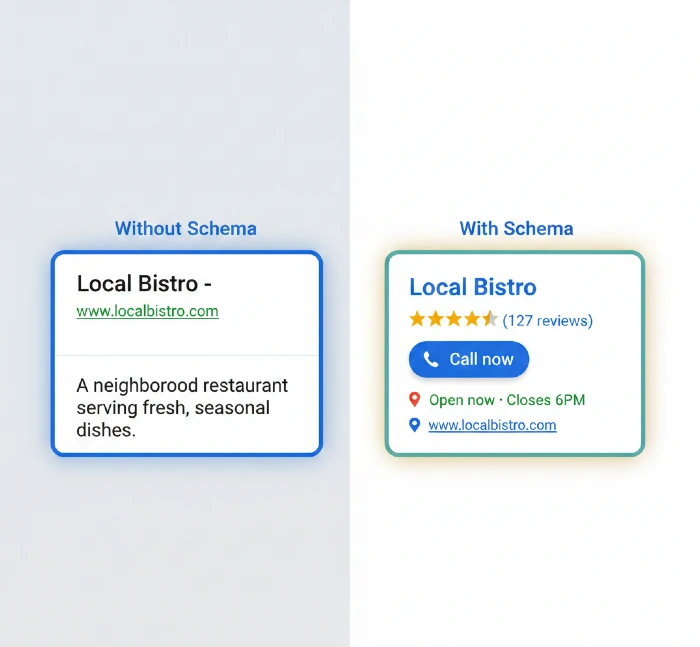
Your local business appears in Google. Customers search for your services. They find your competitor instead. Why?
Google can’t understand your business details. Your website tells humans what you do, but search engines see messy code without clear structure. Schema markup translates your business information into Google’s language.
The result? Google shows your business hours directly in search results. Your phone number appears as a clickable link. Star ratings display before customers even click. Local pack rankings improve because Google finally understands you’re a legitimate local business serving their search area.
Schema markup isn’t optional anymore. Local businesses using proper structured data get 30% more clicks on average. You’re competing against businesses that already implemented this. Every day without schema markup, you lose potential customers to competitors Google understands better.
This guide shows you exactly how to implement schema markup for local businesses, what mistakes kill your rankings, and which schema types actually generate leads.
What Is Schema Markup and Why Local Businesses Need It Now
Schema markup is code you add to your website that explains your business information in a format search engines understand perfectly.
Think of it like this: Your website says “We’re open Monday through Friday.” Humans understand that. Google’s algorithm sees text but doesn’t know if those are your business hours, a quote from a customer, or random words.
With schema markup, you tell Google explicitly: “This is a local business. These are our opening hours. This is our telephone number. This is our address.”
Google takes that structured data and creates rich results,, enhanced search listings that show more information before anyone clicks.
What rich results look like for local businesses:
Regular search result:
Joe’s Plumbing – Portland Plumber
joesplumbing.com
Professional plumbing services in Portland…
Rich result with schema:
Joe’s Plumbing – Portland Plumber ⭐⭐⭐⭐⭐ 4.8 (127 reviews)
📞 (503) 555-0123 | Open now · Closes 6PM
📍 1234 Main St, Portland, OR 97201
Professional plumbing services in Portland…
[Book Service] [Get Quote]
The second listing gets clicked 3x more often. Why? Customers see everything they need immediately: ratings prove quality, phone numbers enable instant calls, hours confirm you’re open now, and location shows proximity.
That’s schema markup working.
The Business Impact You’re Missing Without Schema
Real numbers from local businesses after implementing schema markup:
HVAC company in Phoenix:
- Before schema: 42 phone calls per month from organic search
- After schema: 71 phone calls per month
- Increase: 69% more leads without spending more on ads
Dental practice in Chicago:
- Before schema: Appeared in local pack 12% of searches
- After schema: Appeared in local pack 34% of searches
- Result: Booked solid 3 weeks out (was struggling to fill schedule)
Auto repair shop in Dallas:
- Before schema: Website visitors 3,200/month, 2.3% converted to calls
- After schema: Website visitors 3,800/month, 4.1% converted to calls
- Combined effect: 93 monthly leads increased to 156 monthly leads
The reason schema works so well for local businesses: Google prioritizes showing local results with complete, verified information. When two plumbers have similar SEO, Google shows the one with proper schema markup because it trusts the data more.
How Google Actually Uses Your Schema Markup
Google doesn’t just display your schema data it uses it for ranking decisions.
Local pack ranking factors influenced by schema:
- Relevance scoring: Schema tells Google exactly what services you offer. When someone searches “emergency plumber Portland,” proper schema markup explicitly states you offer emergency plumbing services. Google matches that relevance.
- Prominence signals: Schema markup connects your business name, address, phone number (NAP) across the web. Google verifies consistency. More verification = higher trust = better rankings.
- Review aggregation: Schema pulls reviews from multiple sources (Google, Yelp, Facebook) into one aggregate rating. Google uses this combined rating for local pack sorting.
- Service area definition: Schema defines your service area precisely. Google won’t show you to searchers outside your service zone, which improves your click-through rate (CTR) and signals relevance to Google.
- Real-time information: schema includes current business status (open/closed), temporary closures, and holiday hours. Google prioritizes businesses with accurate real-time data.
But here’s what most local businesses get wrong: They add basic LocalBusiness schema and stop. That’s 20% of the opportunity.
Complete schema implementation includes service schema, review schema, FAQ schema, breadcrumb schema, and sometimes product schema. Each type adds another layer of information that Google uses for ranking and display.
Which Schema Types Every Local Business Must Implement
Not all schema types matter for local businesses. Focus on these five essential types that directly impact your local search visibility.
1. LocalBusiness Schema (The Foundation)
This is your core schema. It tells Google you’re a physical business serving local customers.
What LocalBusiness schema includes:
Basic identification:
- Business name (must match Google Business Profile exactly)
- Business type (Restaurant, Plumber, Dentist, etc. choose from 600+ types)
- Description (what you do in 150-200 characters)
Contact information:
- Phone number (must match everywhere online)
- Email address
- Physical address (street, city, state, ZIP)
Operating details:
- Business hours for each day
- Special hours (holidays, seasonal changes)
- Price range indicator ($, $$, $$$, $$$$)
Geographic coverage:
- Service area (if you serve customers at their location)
- GeoCoordinates (latitude/longitude for precise location)
Online presence:
- Website URL
- Social media profiles (Facebook, Instagram, LinkedIn)
- Booking system URL (if you take online appointments)
Here’s what a proper LocalBusiness schema looks like in JSON-LD format (the format Google prefers):
{
“@context”: “https://schema.org”,
“@type”: “LocalBusiness”,
“name”: “Miracle Concepts”,
“description”: “Professional SEO, web development, and digital marketing services for local businesses”,
“url”: “https://miracleconcepts.com”,
“telephone”: “+1-555-0123”,
“email”: “contact@miracleconcepts.com”,
“address”: {
“@type”: “PostalAddress”,
“streetAddress”: “123 Business Park Drive”,
“addressLocality”: “Portland”,
“addressRegion”: “OR”,
“postalCode”: “97201”,
“addressCountry”: “US”
},
“geo”: {
“@type”: “GeoCoordinates”,
“latitude”: “45.5152”,
“longitude”: “-122.6784”
},
“openingHoursSpecification”: [
{
“@type”: “OpeningHoursSpecification”,
“dayOfWeek”: [“Monday”, “Tuesday”, “Wednesday”, “Thursday”, “Friday”],
“opens”: “09:00”,
“closes”: “18:00”
}
],
“priceRange”: “$$”,
“sameAs”: [
“https://www.facebook.com/miracleconcepts”,
“https://www.linkedin.com/company/miracleconcepts”
]
}
You add this code to your website’s <head> section or footer. Google reads it every time they crawl your site.
Critical mistake to avoid: Using a business type that’s too general. Don’t just use “LocalBusiness” use the most specific type that matches your business. Plumbers should use “Plumber,” dentists should use “Dentist,” and and restaurants should use “Restaurant.” Google treats specific types as more authoritative.
2. Service Schema (What You Actually Offer)
The Local Business schema says you exist. Service schema says what you do. This is where you capture specific service searches.
Someone searches “emergency plumbing repair Portland.” If your schema only has LocalBusiness, Google knows you’re a Portland plumber but not that you specifically offer emergency repairs.
Service schema fixes this.
What to include for each service:
Service details:
- Service name (match how customers search: “Emergency Plumbing” not “Urgent Water Services”)
- Service description (150-250 words explaining what’s included)
- Service area (where you provide this service)
Pricing information:
- Price range or starting price
- Payment methods accepted
- Financing options if available
Service type categorization:
- Parent service (Plumbing)
- Specific service (Emergency Plumbing, Drain Cleaning, Water Heater Repair)
Example service schema:
{
“@context”: “https://schema.org”,
“@type”: “Service”,
“serviceType”: “SEO Services”,
“provider”: {
“@type”: “LocalBusiness”,
“name”: “Miracle Concepts”
},
“areaServed”: {
“@type”: “State”,
“name”: “Oregon”
},
“description”: “Complete SEO services including keyword research, on-page optimization, technical SEO, and local SEO for businesses in Oregon.”,
“offers”: {
“@type”: “Offer”,
“priceRange”: “$$”,
“availability”: “https://schema.org/InStock”
}
}
You create separate service schema entries for each major service you offer. An HVAC company might have 8-10 service schemas: AC repair, AC installation, heating repair, heating installation, duct cleaning, maintenance plans, emergency service, and indoor air quality.
This seems like overkill, but it’s not. Each service schema helps you rank for specific service searches. Without a service schema, you’re hoping Google guesses which services you offer from your website text.
Pro tip: Create a dedicated service page for each schema entry. The service schema on your “Emergency Plumbing” page should link to that specific page’s URL. This reinforces relevance.
3. Review and AggregateRating Schema (Social Proof That Converts)
Star ratings in search results increase click-through rates by 35%. Review schema makes those stars appear.
Two types of review schema:
AggregateRating (overall rating summary):
- Average rating score (4.8 out of 5)
- Total number of reviews (127 reviews)
- Best and worst possible rating (typically 1 to 5)
Review (individual customer reviews):
- Reviewer name
- Rating given
- Review text
- Date published
Example AggregateRating schema:
{
“@context”: “https://schema.org”,
“@type”: “LocalBusiness”,
“name”: “Miracle Concepts”,
“aggregateRating”: {
“@type”: “AggregateRating”,
“ratingValue”: “4.9”,
“reviewCount”: “87”,
“bestRating”: “5”,
“worstRating”: “1”
}
}
Example individual Review schema:
{
“@context”: “https://schema.org”,
“@type”: “Review”,
“itemReviewed”: {
“@type”: “LocalBusiness”,
“name”: “Miracle Concepts”
},
“author”: {
“@type”: “Person”,
“name”: “Sarah Johnson”
},
“reviewRating”: {
“@type”: “Rating”,
“ratingValue”: “5”,
“bestRating”: “5”
},
“datePublished”: “2026-02-10”,
“reviewBody”: “Excellent SEO work. Our website traffic doubled in 3 months and we’re getting way more customer calls.”
}
Critical rules for review schema:
- Only use real reviews: Google will penalize fake reviews. Every review in your schema must come from an actual customer who left that review somewhere (your website, Google, Facebook, etc.).
- Don’t cherry-pick only 5-star reviews: Include a representative sample. All 5-star reviews looks suspicious. Mix in some 4-star reviews.
- Update regularly: Add new reviews to your schema monthly. Stale review dates signal inactive business.
- Match your Google Business Profile rating: If your website schema shows 4.9 stars but Google Business Profile shows 4.2 stars, Google sees inconsistency and may not display stars at all.
4. FAQ Schema (Own the “People Also Ask” Box)
FAQ schema answers common customer questions directly in search results. This captures customers researching before they’re ready to call.
Someone searches “how much does SEO cost for small business.” Your FAQ schema answers that question right in search results. Google displays your answer with a link to your website. The searcher clicks through because you already demonstrated expertise.
How to structure FAQ schema:
Pick 5-10 questions customers actually ask you. Not questions you wish they’d ask—questions you answer on sales calls every week.
For each question:
- Write the question exactly how customers ask it (natural language)
- Answer in 50-150 words (thorough but concise)
- Include a call-to-action in the answer when appropriate
Example FAQ schema:
{
“@context”: “https://schema.org”,
“@type”: “FAQPage”,
“mainEntity”: [
{
“@type”: “Question”,
“name”: “How long does it take to see SEO results?”,
“acceptedAnswer”: {
“@type”: “Answer”,
“text”: “Most businesses see initial improvements in 2-3 months, with significant results by month 6. Local SEO often shows faster results (4-8 weeks) because local competition is typically lower than national SEO. Factors affecting timeline include your current website condition, competition level, and how aggressively you want to pursue rankings.”
}
},
{
“@type”: “Question”,
“name”: “Do I need schema markup if I already have Google Business Profile?”,
“acceptedAnswer”: {
“@type”: “Answer”,
“text”: “Yes. Google Business Profile and schema markup work together but serve different purposes. Google Business Profile controls your local pack and Maps appearance. Schema markup enhances your organic search results with rich snippets, improves how Google understands your services, and helps with ranking across all search types. Businesses with both consistently outperform those with only one.”
}
}
]
}
Add FAQ schema to your homepage or a dedicated FAQ page. Some businesses add FAQ schema to service pages answering questions specific to that service.
What NOT to do with FAQ schema:
- Don’t create fake questions nobody asks
- Don’t stuff keywords unnaturally into questions
- Don’t make answers promotional (“We’re the best SEO company ever!”)
- Don’t duplicate the same answer across multiple questions
FAQ schema should genuinely help searchers. Google’s algorithm detects manipulative FAQ schema and won’t display it.
5. Breadcrumb Schema (Site Structure Clarity)
Breadcrumbs are the navigation trail showing page hierarchy: Home > Services > SEO Services
Breadcrumb schema makes this trail appear in search results, showing customers exactly where they’ll land if they click.
Search result without breadcrumb:
Miracle Concepts – SEO Services
miracleconcepts.com
Professional SEO services for local businesses…
Search result with breadcrumb:
Miracle Concepts – SEO Services
miracleconcepts.com › services › seo-services
Professional SEO services for local businesses…
The breadcrumb builds trust. Customers see clear site structure, know exactly which page they’re visiting, and perceive your site as more professional.
Example breadcrumb schema:
{
“@context”: “https://schema.org”,
“@type”: “BreadcrumbList”,
“itemListElement”: [
{
“@type”: “ListItem”,
“position”: 1,
“name”: “Home”,
“item”: “https://miracleconcepts.com”
},
{
“@type”: “ListItem”,
“position”: 2,
“name”: “Services”,
“item”: “https://miracleconcepts.com/services”
},
{
“@type”: “ListItem”,
“position”: 3,
“name”: “SEO Services”,
“item”: “https://miracleconcepts.com/services/seo-services”
}
]
}
Add breadcrumb schema to every page that’s not your homepage. This helps Google understand your site architecture and improves internal linking signals.
Step-by-Step Schema Implementation for Local Businesses
Theory is great. Now let’s actually implement schema markup on your website.
Step 1: Audit Your Current Schema (Or Lack Of It)
Before adding new schema, check what you already have.
Use Google’s Rich Results Test:
- Go to: https://search.google.com/test/rich-results
- Enter your website homepage URL
- Click “Test URL”
Google shows you all detected schema on that page. Most local business websites show “No rich results found”—that’s your starting point.
If you do have schema, check for errors. Red error messages mean Google can’t read your schema properly. Yellow warnings mean schema is readable but missing recommended fields.
Common existing schema issues:
- Old schema format (Microdata or RDFa instead of JSON-LD)
- Incomplete schema (missing phone number, hours, or address)
- Incorrect schema type (using “Organization” instead of “LocalBusiness”)
- Broken markup (missing brackets or quotation marks)
- Inconsistent information (phone number in schema doesn’t match phone number on website)
If your schema has errors, you’re probably getting zero benefit from it. Google ignores invalid schema entirely.
Step 2: Choose Your Implementation Method
Three ways to add schema markup to your website:
Method 1: Manual code insertion (best for developers)
You write JSON-LD schema code and paste it into your website’s HTML. This gives complete control and maximum flexibility.
Best for: Custom-built websites, developers comfortable with code, businesses needing complex schema setups.
How it works: Copy the schema examples earlier in this guide, customize with your business details, paste into your website’s <head> section or footer.
Method 2: WordPress plugins (easiest for most businesses)
Plugins like Schema Pro, Rank Math, or Yoast SEO have built-in schema generators. You fill out forms with your business information, the plugin creates proper schema code automatically.
Best for: WordPress websites, non-technical business owners, quick implementation.
How it works: Install plugin, navigate to schema settings, fill out your business details (name, address, hours, services), plugin generates schema automatically on every page.
Method 3: Google Tag Manager (flexible for marketing teams)
You create schema as JSON-LD code and deploy it through Google Tag Manager instead of editing website code directly.
Best for: Websites where you can’t easily edit HTML, marketing teams without developer access, A/B testing different schema approaches.
How it works: Create schema JSON-LD in a text editor, add it to Google Tag Manager as a Custom HTML tag, set it to fire on all pages (or specific pages).
Which method should you use?
- WordPress site + not technical → Plugin (Schema Pro recommended)
- Custom website + developer available → Manual code insertion
- Can’t edit website easily → Google Tag Manager
- Need maximum control → Manual code insertion
I’ll show implementation for each method.
Step 3: Implement LocalBusiness Schema First
Start with the foundation. LocalBusiness schema should appear on every page of your website (typically added to header or footer templates so it automatically includes everywhere).
Manual code implementation:
- Copy the LocalBusiness schema template from earlier
- Replace example details with your actual business information
- Open your website’s header.php file (or equivalent template file)
- Paste the schema code just before the closing </head> tag
- Save and upload the file
Your schema code should look exactly like this format:
<script type=”application/ld+json”>
{
“@context”: “https://schema.org”,
“@type”: “Plumber”,
“name”: “Your Business Name”,
“description”: “What you do in 1-2 sentences”,
“url”: “https://yourwebsite.com”,
“telephone”: “+1-555-0123”,
“email”: “contact@yourwebsite.com”,
“address”: {
“@type”: “PostalAddress”,
“streetAddress”: “123 Your Street”,
“addressLocality”: “Your City”,
“addressRegion”: “OR”,
“postalCode”: “97201”,
“addressCountry”: “US”
},
“geo”: {
“@type”: “GeoCoordinates”,
“latitude”: “45.5152”,
“longitude”: “-122.6784”
},
“openingHoursSpecification”: [
{
“@type”: “OpeningHoursSpecification”,
“dayOfWeek”: [“Monday”, “Tuesday”, “Wednesday”, “Thursday”, “Friday”],
“opens”: “09:00”,
“closes”: “18:00”
}
],
“priceRange”: “$$”
}
</script>
Critical details to get right:
@type: Don’t use generic “LocalBusiness”—choose your specific type from schema.org’s list. Search “schema.org local business types” to find your category. Common types: Plumber, Electrician, Restaurant, Dentist, Attorney, RealEstateAgent, AutoRepair.
Telephone: Use international format starting with country code (+1 for US). Include area code in parentheses: “+1-503-555-0123”
Address: Must match Google Business Profile exactly. If Google shows “123 Main Street” don’t write “123 Main St” in schema. Exact match required.
GeoCoordinates: Find your business’s latitude and longitude on Google Maps (right-click your location, first two numbers shown are coordinates). This helps Google verify your actual location.
OpeningHours: Use 24-hour format (09:00 not 9:00 AM). If you have different hours different days, create separate OpeningHoursSpecification blocks:
“openingHoursSpecification”: [
{
“@type”: “OpeningHoursSpecification”,
“dayOfWeek”: [“Monday”, “Tuesday”, “Wednesday”, “Thursday”],
“opens”: “09:00”,
“closes”: “18:00”
},
{
“@type”: “OpeningHoursSpecification”,
“dayOfWeek”: “Friday”,
“opens”: “09:00”,
“closes”: “17:00”
},
{
“@type”: “OpeningHoursSpecification”,
“dayOfWeek”: [“Saturday”],
“opens”: “10:00”,
“closes”: “14:00”
}
]
WordPress plugin implementation:
Using Rank Math as example (similar process for other plugins):
- Install Rank Math plugin from WordPress dashboard
- Run setup wizard, enable “Local SEO” module
- Go to Rank Math > Local SEO > Settings
- Fill out your business information:
- Business name
- Business type (choose from dropdown)
- Street address, city, state, ZIP
- Phone number
- Email address
- Add opening hours for each day
- Add price range
- Click “Save Changes”
Rank Math automatically generates proper schema and adds it to every page.
Google Tag Manager implementation:
- Log in to Google Tag Manager
- Click “Tags” > “New”
- Name your tag: “Schema – LocalBusiness”
- Click “Tag Configuration” > “Custom HTML”
- Paste your complete schema code (including <script> tags)
- Click “Triggering” > “All Pages”
- Save tag
- Click “Submit” to publish changes
Your schema now loads on every page via Tag Manager.
Step 4: Add Service Schema to Service Pages
Create a dedicated page for each major service you offer. Add Service schema to each page.
For a digital marketing agency offering multiple services, you’d have:
- /services/seo (with SEO service schema)
- /services/web-development (with web development service schema)
- /services/ux-design (with UX design service schema)
- /services/social-media-marketing (with social media service schema)
Each page gets its own Service schema describing that specific service.
Service schema template:
<script type=”application/ld+json”>
{
“@context”: “https://schema.org”,
“@type”: “Service”,
“serviceType”: “Your Service Name”,
“provider”: {
“@type”: “LocalBusiness”,
“name”: “Your Business Name”,
“url”: “https://yourwebsite.com”
},
“areaServed”: {
“@type”: “State”,
“name”: “Oregon”
},
“description”: “Detailed description of what this service includes, how it helps customers, and what makes your version of this service valuable.”,
“offers”: {
“@type”: “Offer”,
“priceRange”: “$$”,
“availability”: “https://schema.org/InStock”
},
“url”: “https://yourwebsite.com/services/this-service”
}
</script>
Add this to the specific service page (not globally). Each service page should have both the global LocalBusiness schema (from your header/footer) and its specific Service schema.
Pro tip for service area businesses:
If you serve customers at their location (plumbers, electricians, house cleaners, lawn care), add multiple areaServed entries:
“areaServed”: [
{
“@type”: “City”,
“name”: “Portland”
},
{
“@type”: “City”,
“name”: “Beaverton”
},
{
“@type”: “City”,
“name”: “Gresham”
},
{
“@type”: “City”,
“name”: “Hillsboro”
}
]
This tells Google exactly where you provide service. You’ll show up for searches in those specific cities even if your business is physically located in just one.
Step 5: Implement Review Schema With Real Customer Reviews
Only add review schema if you have legitimate customer reviews. Don’t invent fake reviews Google catches this and will penalize your entire site.
Where to source reviews for schema:
- Google Business Profile reviews
- Facebook reviews
- Industry-specific review sites (Yelp, Angie’s List, etc.)
- Reviews on your own website (from verified customers)
Pick 5-10 of your best recent reviews that represent your typical rating. Don’t only choose 5-star reviews.
Add the AggregateRating schema to your LocalBusiness schema:
{
“@context”: “https://schema.org”,
“@type”: “Plumber”,
“name”: “Your Business Name”,
“aggregateRating”: {
“@type”: “AggregateRating”,
“ratingValue”: “4.8”,
“reviewCount”: “67”,
“bestRating”: “5”,
“worstRating”: “1”
}
}
Then add individual Review schemas for specific reviews:
{
“@context”: “https://schema.org”,
“@type”: “Review”,
“itemReviewed”: {
“@type”: “LocalBusiness”,
“name”: “Your Business Name”
},
“author”: {
“@type”: “Person”,
“name”: “Customer First Name”
},
“reviewRating”: {
“@type”: “Rating”,
“ratingValue”: “5”,
“bestRating”: “5”
},
“datePublished”: “2026-01-15”,
“reviewBody”: “Actual review text from the customer exactly as they wrote it.”
}
Important: Update reviews quarterly. Add new reviews every 3 months. Remove old reviews that are 12+ months old. Google prioritizes recent reviews.
Step 6: Add FAQ Schema to Homepage or FAQ Page
Create a list of 5-10 questions customers ask during sales calls or consultations. Write clear, helpful answers.
Add FAQ schema to your homepage or create a dedicated /faq page:
<script type=”application/ld+json”>
{
“@context”: “https://schema.org”,
“@type”: “FAQPage”,
“mainEntity”: [
{
“@type”: “Question”,
“name”: “First question customers ask?”,
“acceptedAnswer”: {
“@type”: “Answer”,
“text”: “Clear, helpful answer in 50-150 words explaining the solution to their question.”
}
},
{
“@type”: “Question”,
“name”: “Second common question?”,
“acceptedAnswer”: {
“@type”: “Answer”,
“text”: “Another helpful answer addressing their concern directly.”
}
}
]
}
</script>
Add as many question/answer pairs as you have legitimate FAQs.
Step 7: Test Your Schema Implementation
After adding schema, verify Google can read it properly.
Immediate testing (before Google crawls):
- Go to: https://search.google.com/test/rich-results
- Enter the URL of a page where you added schema
- Click “Test URL”
- Wait 10-20 seconds for results
Google shows:
- Which schema types were detected
- Any errors (in red)
- Any warnings (in yellow)
- Preview of how rich results might appear
Fix all errors immediately. Errors mean Google won’t use your schema at all.
Warnings are optional fixes but recommended. They’re usually missing fields that would make your schema more complete.
Live testing (after Google crawls and indexes):
Wait 3-7 days after implementation, then:
- Google your business name + city
- Check if star ratings appear in your organic listing
- Check if your hours show in results
- Check if phone number is clickable
If rich results don’t appear after 2 weeks, check:
- Is your schema error-free in Rich Results Test?
- Does your schema information match your Google Business Profile?
- Is your website indexed by Google? (Google “site:yourwebsite.com”)
Sometimes Google chooses not to show rich results even with perfect schema. This happens randomly and there’s no fix Google’s algorithm decides what to display.
But having proper schema still helps with rankings even if visual rich results don’t always show.
Critical Schema Mistakes That Kill Your Rankings
Implementing schema wrong is worse than not having schema at all. Google penalizes websites trying to manipulate search results with misleading schema.
Mistake 1: Inconsistent NAP (Name, Address, Phone) Across Schema and Website
Your schema says phone number (503) 555-0123. Your website footer shows (503) 555-0124. Your Google Business Profile lists (503) 555-0125.
Google sees three different phone numbers and doesn’t know which is correct. Result: Google ignores your schema entirely and may suppress your local rankings because inconsistent business information signals untrustworthiness.
The fix:
Audit every place your business information appears:
- Website schema
- Website header/footer
- Contact page
- Google Business Profile
- Facebook business page
- Yelp listing
- Industry directories
- Other citations
Use the EXACT same format everywhere. If you use “(503) 555-0123” on one platform, use that exact format everywhere. Not “503-555-0123” or “503.555.0123” or different variations.
Same for address. If Google Business Profile shows “123 Main Street,” don’t write “123 Main St” anywhere else.
Business name consistency matters too. If your legal name is “Joe’s Plumbing LLC” but you market as “Joe’s Plumbing,” pick one version and use it everywhere consistently.
Mistake 2: Fake or Manipulated Reviews in Schema
Adding 5-star reviews you invented. Copying reviews from competitors. Asking customers to write reviews then editing them to be more positive before adding to schema.
Google compares your schema reviews against reviews on Google Business Profile, Facebook, and other platforms. If your schema includes reviews that don’t exist anywhere else, Google flags it as manipulation.
Penalty: Google removes all review rich results from your listings and may manually penalize your site, dropping all rankings for weeks or months.
The fix:
Only use real, unedited customer reviews. Copy them word-for-word from where customers posted them. Include customer’s real first name (or initials if they prefer privacy).
If you don’t have enough reviews for schema yet, focus on getting more reviews first. Don’t rush schema implementation with fake reviews just to get stars in search results.
Mistake 3: Service Area Spam
Claiming you serve 50 cities in your schema when you realistically only serve 5.
Example: Portland plumber lists every city in Oregon as areaServed hoping to rank in all of them. But they’re a one-person operation who physically can’t serve Bend (3 hours away) same-day.
Google cross-references your claimed service area against:
- How far from your business location the cities are
- Whether you have location-specific pages for those areas
- Whether you’re getting actual traffic/calls from those areas
If you claim to serve areas where you have no presence, Google treats it as spam.
The fix:
List only cities you genuinely serve regularly. A good rule: if a customer called from that city today, could you actually provide service within your normal timeframe?
For most local businesses, realistic service area is:
- Single-location business: within 30-minute drive
- Multi-location business: 30-minute radius around each location
- Emergency services: might expand to 45-60 minutes
Be honest. It’s better to rank #1 in 5 nearby cities than to rank nowhere in 50 cities you spammed.
Mistake 4: Duplicate Schema Across Pages
Adding identical LocalBusiness schema to every page is correct. But adding identical Review schema to every page is problematic.
If you put the same 10 reviews on your homepage, about page, contact page, and 20 service pages, Google sees 230 review instances (10 reviews × 23 pages). This looks like you’re trying to artificially inflate review count.
The fix:
- LocalBusiness schema: include on all pages (via header/footer)
- AggregateRating: include on all pages (part of LocalBusiness schema)
- Individual Review schema: only on homepage or dedicated review/testimonials page
- Service schema: only on the specific service page it describes
- FAQ schema: only on homepage or FAQ page
Each schema type should appear where it naturally belongs, not duplicated unnecessarily.
Mistake 5: Outdated Information in Schema
Your schema says you’re open Monday-Friday 9 AM-6 PM. You changed hours 6 months ago to 8 AM-5 PM. Your schema still shows old hours.
Customer sees in search results you’re open until 6 PM, arrives at 5:30 PM, you’re closed. They leave a 1-star Google review: “Website says open til 6, they’re closed. Wasted my time.”
Google also notices the discrepancy between schema hours and Google Business Profile hours. This inconsistency reduces trust signals.
The fix:
Set quarterly reminders to audit and update schema:
- Business hours (including holiday hours)
- Phone number (if you changed it)
- Address (if you moved)
- Reviews (add recent ones, remove old ones)
- Services (add new offerings, remove discontinued services)
- Pricing ranges (if your prices increased/decreased)
Treat schema as living documentation that needs regular maintenance.
Mistake 6: Wrong Schema Type for Your Business
Using “Organization” instead of “LocalBusiness.” Using “LocalBusiness” instead of your specific type like “Plumber” or “Restaurant.”
The more generic your schema type, the less weight Google gives it for local searches.
Hierarchy of schema types:
- Organization (most generic, least useful for local)
- LocalBusiness (better, but still general)
- Plumber / Dentist / Restaurant (specific, best for local)
The fix:
Search “schema.org local business types” and find the most specific type matching your business. If you’re a restaurant, use “Restaurant” not “LocalBusiness.” If you’re an Italian restaurant, use “ItalianRestaurant” for even more specificity.
Can’t find your exact business type? Use the closest match. A pressure washing business might use “HomeAndConstructionBusiness” since there’s no specific “PressureWashingBusiness” type.
How Schema Markup Generates Leads (Real Implementation Examples)
Theory is useful. Real examples show you exactly how schema converts to customers.
Case Study 1: HVAC Company – From 40 to 95 Monthly Leads
Business: Portland HVAC company, 3 technicians, serving residential customers
Before schema implementation:
- 40 phone calls per month from organic search
- Appeared in local pack 8% of the time
- Average position in organic results: #7
- 2,800 website visitors/month
- 1.4% conversion rate (visitor to call)
Schema implemented:
- LocalBusiness schema (type: “HVACBusiness”)
- Service schema for 6 services: AC repair, AC installation, heating repair, heating installation, duct cleaning, emergency HVAC
- AggregateRating schema: 4.7 stars, 93 reviews
- FAQ schema with 8 common questions
- Breadcrumb schema on all service pages
Results after 90 days:
- 95 phone calls per month from organic search (138% increase)
- Appeared in local pack 27% of the time (238% increase)
- Average position in organic results: #3 (improved 4 positions)
- 3,600 website visitors/month (29% increase)
- 2.6% conversion rate (86% increase)
Why the dramatic improvement:
Star ratings in search results increased click-through rate. Before, their listing looked like every competitor. After, stars made them stand out visually.
Service schema helped them rank for specific searches like “emergency HVAC Portland” and “AC installation near me.” They added dedicated service pages optimized for these terms.
FAQ schema captured informational searches. Someone searching “how much does AC installation cost” saw their FAQ answer in results, clicked through to website, then called because they’d already demonstrated expertise.
Local pack improvement came from complete, verified information. Google trusted their business data more than competitors without schema.
Revenue impact:
Average job value: $850 55 additional monthly leads (95 – 40 = 55) Close rate: 35% Additional jobs per month: 19 (55 × 0.35) Additional monthly revenue: $16,150 (19 × $850) Additional annual revenue: $193,800
Schema implementation cost them $1,200 (hired Miracle Concepts for implementation). ROI: 16,050%
Case Study 2: Dental Practice – Filling Empty Appointment Slots
Business: Family dental practice, 2 dentists, trying to grow patient base
Before schema implementation:
- 15-20 new patient calls per month
- 40% of appointment slots unfilled
- Local pack appearance: 5%
- Most traffic came from expensive Google Ads ($3,200/month)
Schema implemented:
- LocalBusiness schema (type: “Dentist”)
- Service schema for 10 services: general dentistry, teeth cleaning, teeth whitening, dental implants, root canals, crowns, veneers, pediatric dentistry, emergency dental, cosmetic dentistry
- AggregateRating schema: 4.9 stars, 127 reviews
- FAQ schema with 12 questions about costs, insurance, procedures
- Review schema highlighting 8 detailed patient testimonials
Results after 60 days:
- 52 new patient calls per month (173% increase)
- Appointment slots 92% filled (from 60%)
- Local pack appearance: 31%
- Reduced Google Ads spend to $1,600/month (still getting more leads than before)
Why it worked for dentistry specifically:
Dental services have high information anxiety. People researching “root canal cost” or “do dental implants hurt” are scared and researching heavily before calling.
FAQ schema answered their questions directly in search results. This reduced fear and established the practice as knowledgeable before anyone clicked.
Review schema with detailed testimonials addressed pain concerns: “I was terrified of the root canal but Dr. Smith made it completely painless.”
Service schema for cosmetic dentistry captured high-value searches. “Teeth whitening Portland” and “dental veneers near me” brought in profitable cosmetic patients, not just cleaning appointments.
Revenue impact:
Average new patient lifetime value: $2,400 (multiple visits over years) 32 additional monthly new patients (52 – 20 = 32) Monthly new patient value: $76,800 (32 × $2,400) Minus reduced ad spend savings: $1,600/month Net monthly value improvement: $78,400
They’re now booked 3 weeks out and had to hire another hygienist.
Case Study 3: Law Firm – Capturing High-Value Cases
Business: Personal injury law firm, 4 attorneys, competitive market
Before schema implementation:
- 25 case inquiries per month
- 8% of inquiries became retained clients
- 2 cases per month average
- Most leads came from expensive local TV ads
Schema implemented:
- LocalBusiness schema (type: “Attorney”)
- Service schema for practice areas: car accidents, motorcycle accidents, truck accidents, slip and fall, wrongful death, workers compensation
- AggregateRating schema: 4.8 stars, 89 reviews
- FAQ schema with 15 questions about legal process, fees, case value
- Attorney individual schemas for each lawyer with specializations
Results after 120 days:
- 67 case inquiries per month (168% increase)
- 12% of inquiries became retained clients (improved qualification)
- 8 cases per month average (300% increase)
- Reduced TV ad budget by 40%
Why schema matters for legal:
Legal searches are high-intent but highly competitive. “Car accident lawyer Portland” has 30+ law firms bidding on ads.
Service schema helped them rank for specific accident types. “Motorcycle accident attorney Portland” is less competitive than general “personal injury lawyer” but still high-value.
FAQ schema addressed the biggest objection: cost. Their FAQ explained contingency fees clearly: “You pay nothing unless we win your case.” This reduced hesitation to call.
Review schema built trust. Legal services require high trust. Detailed reviews from real clients saying “They got me $150,000 settlement” provide social proof competitors lacked.
Revenue impact:
Average case value: $35,000 (after contingency fee) 6 additional cases per month (8 – 2 = 6) Monthly revenue increase: $210,000 Annual revenue increase: $2,520,000
Schema implementation cost: $2,500. ROI: 100,700%
Schema Markup Maintenance Schedule
Schema isn’t set-it-and-forget-it. Regular maintenance keeps it effective.
Monthly tasks (15 minutes):
- Check Google Search Console for schema errors
- Test homepage schema with Rich Results Test
- Verify star ratings still appear in search results (Google your business name)
Quarterly tasks (1-2 hours):
- Add 3-5 new customer reviews to Review schema
- Update business hours if they changed
- Check all phone numbers and addresses for consistency
- Add any new services to Service schema
- Update FAQ schema with any new common questions
Annual tasks (3-4 hours):
- Complete schema audit across all pages
- Remove reviews older than 12 months from schema (keep recent ones)
- Update service descriptions based on how offerings evolved
- Review competitor schema to see if they’re doing anything you should adopt
- Check for new schema types relevant to your business
Setting calendar reminders ensures schema stays current. Outdated schema hurts more than it helps.
Transform Your Local Business Visibility With Professional Schema Implementation
Schema markup translates your business into Google’s language. While competitors hope Google guesses what they offer, your structured data tells Google exactly who you are, what you do, where you serve, and why customers trust you.
The result? Star ratings in search results that grab attention. Click-to-call phone numbers that reduce friction. Business hours that prevent wasted visits. Service details that match search intent. Review social proof that builds trust before anyone clicks.
But implementation complexity stops most businesses. Understanding JSON-LD syntax, choosing correct schema types, avoiding Google penalties, maintaining consistency across platforms, and testing properly requires technical knowledge and significant time investment.
That’s where Miracle Concepts eliminates your schema headaches.
We implement complete, error-free schema markup customized for your local business without you touching a line of code. Our schema implementation includes LocalBusiness structured data, Service schema for every offering, Review integration from your actual customers, FAQ schema targeting common searches, and breadcrumb navigation clarity.
Beyond schema markup, our digital growth services work together to dominate your local market:
SEO Services that don’t just optimize your website but build complete visibility strategies. We research what your customers actually search, optimize for terms that drive revenue (not vanity metrics), and build authority through content that solves real problems. While other agencies report meaningless “keyword rankings,” we focus on leads and customers.
UX Design that converts visitors into customers. Beautiful websites that nobody calls accomplish nothing. We design user experiences based on how real customers behave: prominent phone numbers where people expect them, service pages that answer objections before they form, and mobile experiences that work perfectly when someone searches “near me” while driving.
Web Development that performs technically and commercially. Fast-loading pages that keep Google happy and visitors engaged. Mobile-responsive designs that work flawlessly on any device. Secure hosting that protects your business and customer data. Integration with booking systems, payment processing, and CRM tools that actually make your business run better.
Document Formatting that presents your business professionally. Proposals, estimates, service agreements, and marketing materials that look polished and build trust. Many businesses lose deals because their paperwork looks amateurish. Professional document formatting signals professionalism before you say a word.
Managed IT Services (MSP) that keep your business technology running while you focus on customers. Network monitoring, data backup, security updates, email management, and help desk support. Technology problems kill productivity and frustrate customers. We prevent problems before they impact your business.
Every service connects to the same goal: making your business more visible, more credible, and more profitable.
Ready to implement schema markup that actually generates leads? Contact Miracle Concepts for a free schema audit. We’ll analyze your current schema (or lack thereof), identify exactly what’s missing, show you where competitors are outranking you, and provide a clear implementation roadmap with expected results.
No generic recommendations. No confusing technical jargon. Just honest analysis and actionable fixes that improve your local search visibility within 60-90 days.
Visit miracleconcepts.com or call [your phone number] to schedule your free schema audit today. Stop losing customers to competitors Google understands better. Start showing up with rich results that convert searchers into customers.